Model Registry Service Design
Functional Specifications
Model Naming Conventions
Each model registered in the service registry should have a unique, human readable, concise and informative name, making it easy to understand the model's content at a glance.
Since in Harbor it is possible to group repositories by projects it is reasonable to use the same model organization structure in the Model Registry service as well. According to that the full model name can have the following format:
[registry address]/[project name]/[image name]/[tag]
| Name Part | Description |
|---|---|
| registry address | The obligatory part that specifies which registry should be used to upload the model. The corresponding Harbor instance should be used to push a model to the local Harbor registry. |
| project name | Should be exactly the same as the target Harbor project name. Also the project name corresponds to a tenant and allows keeping of models separately and with authorised access to them. |
| image/model name | A free text that should explain and describe the model’s content. |
| tag | A unique model version identifier. |
There are the following rules should be applied for proper models naming:
-
Model Name Specification:
- The model name should generally be lowercase to prevent case-sensitivity issues across different systems and registries.
- Any special characters (beyond allowed) must be avoided: only hyphens (-), underscores (_), and periods (.) are allowed in image names. All other special characters must be avoided for better compatibility and readability.
-
Tag Name Specification:
- Semantic versioning is a widely used versioning scheme that uses a three-part version number consisting of major, minor, and patch versions. The version is typically written in the format “major.minor.patch”. It should be applied for tags as well.
Each model update should lead to a version update to keep track of every change made to the codebase or model dependencies. Clear version histories allow quick rollbacks if something goes wrong without losing progress.
Lifecycle Management
The following phases of the model life cycle are used for efficient allocation of finite infrastructure resources and minimization maintenance overheads. An organized pipeline keeps everyone aligned towards common objectives.
| Phase Name | Description |
|---|---|
| Image Creation | The image is built and wrapped using XUMI functionality. The expected model functionality is verified and the model is ready for publishing. |
| Image tag assignment | An appropriate image tag is assigned to the image by the user as a required step before pushing the model to the corresponding registry. |
| Model signing and pushing | Such signing tools as Cosign and Notation typically perform an image signing operation simultaneously with pushing an image to the specified registry. |
| Image is stored in local registry | The model is stored in a local Harbor local registry for sharing and distribution. Images are versioned using tags to track changes and facilitate rollbacks.Each tag contains a project name which owns this particular model. |
| Automatic model scanning | Once a model is pushed to the local Harbor storage the default security scanner is activated and verifies the recently added image for vulnerabilities |
| Deployment to Remote Registry | The scanned and approved (signed) model is uploaded to a remote registry and becomes available for . |
| Model Updates and Maintenance | The model is rebuilt when the underlying application code or dependencies are changed or when detected vulnerabilities should be addressed. It leads to a new model version creation and starting the model life cycle from the beginning. |
| Model download and execution | A verified and approved model that is available in a remote storage can be used by users who have authorized access to it. They can pull the model and execute it. |
| Model changes synchronization | Handle conflicts of detected version mismatches in a remote container. Model versions synchronization is performed in automatic mode when a newer model version appears in a remote registry and it is absent in the local registry. |
| Image cleanup and deletion | Old or unused images consume disk space and should be removed based on specific rules. |
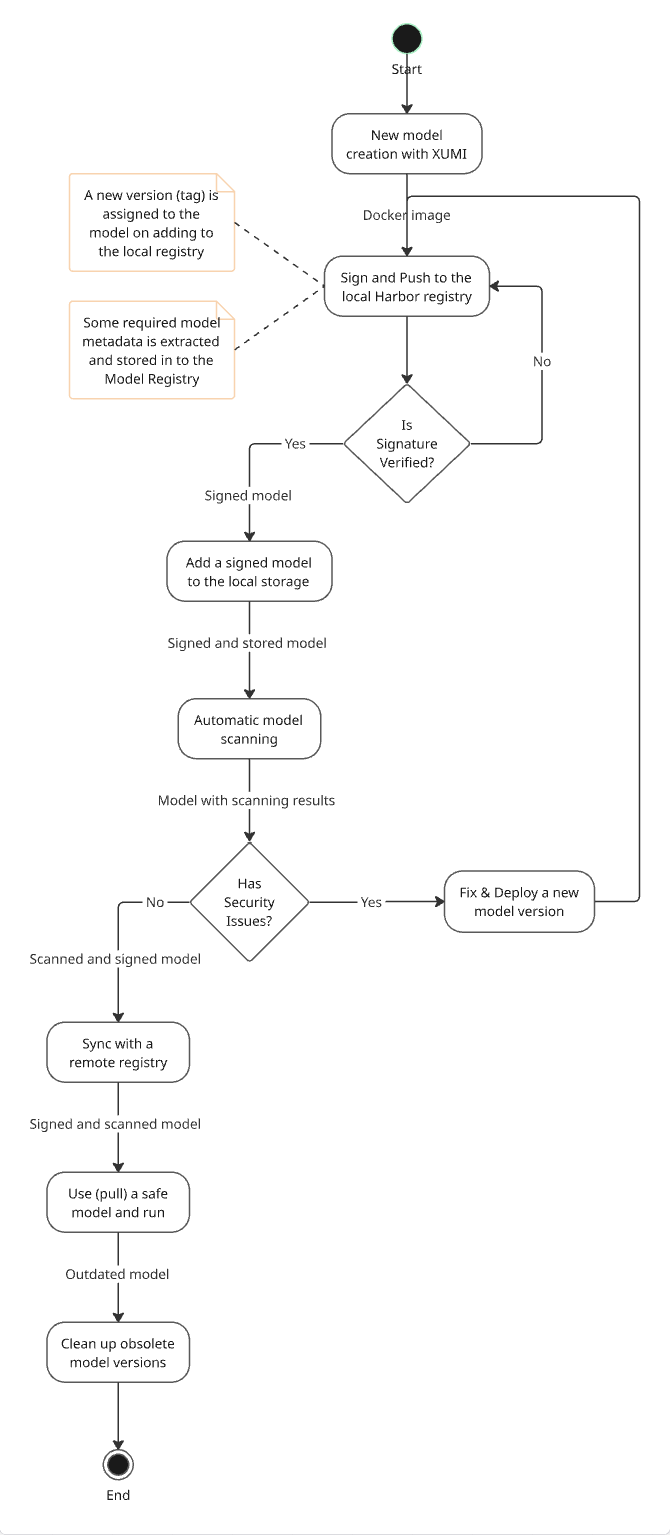
Model life cycle is depicted on the diagram below.
Model Lifecycle
Note
The required step for the model scanning is combined with model deployment to a remote registry since such remote containers as Harbor have in-built possibility to verify uploaded models for vulnerabilities.
Security and Access Control
Policy-based access control (PBAC) is required to allow access for those users who should create, modify, or remove models. Strict authentication protocols (JWT) must be enforced when communicating with external or internal services. Please refer to the corresponding document for more information - Role-based access system architecture.
Metadata Tagging
In addition to versioning metadata provides contextual insights about the origin, purpose, and characteristics of each model version. It serves both diagnostic purposes (debugging issues) and strategic decision-making. The additional metadata can be stored alongside each uploaded model, including timestamps, owner information, model checkpoints, dataset references, runtime requirements, and custom labels.
Checkpoint Management
Checkpoints are closely linked to the model entity. Unlike models, checkpoints are managed and monitored using the Assets service. Future plans include the integration of checkpoint versions into the Model Registry service.
Application Architecture
Overview
The service is based on a close integration with the Harbor project. Harbor is an open-source registry that provides secure storage and management for container images, offering features like vulnerability scanning, policy enforcement, and role-based access control.
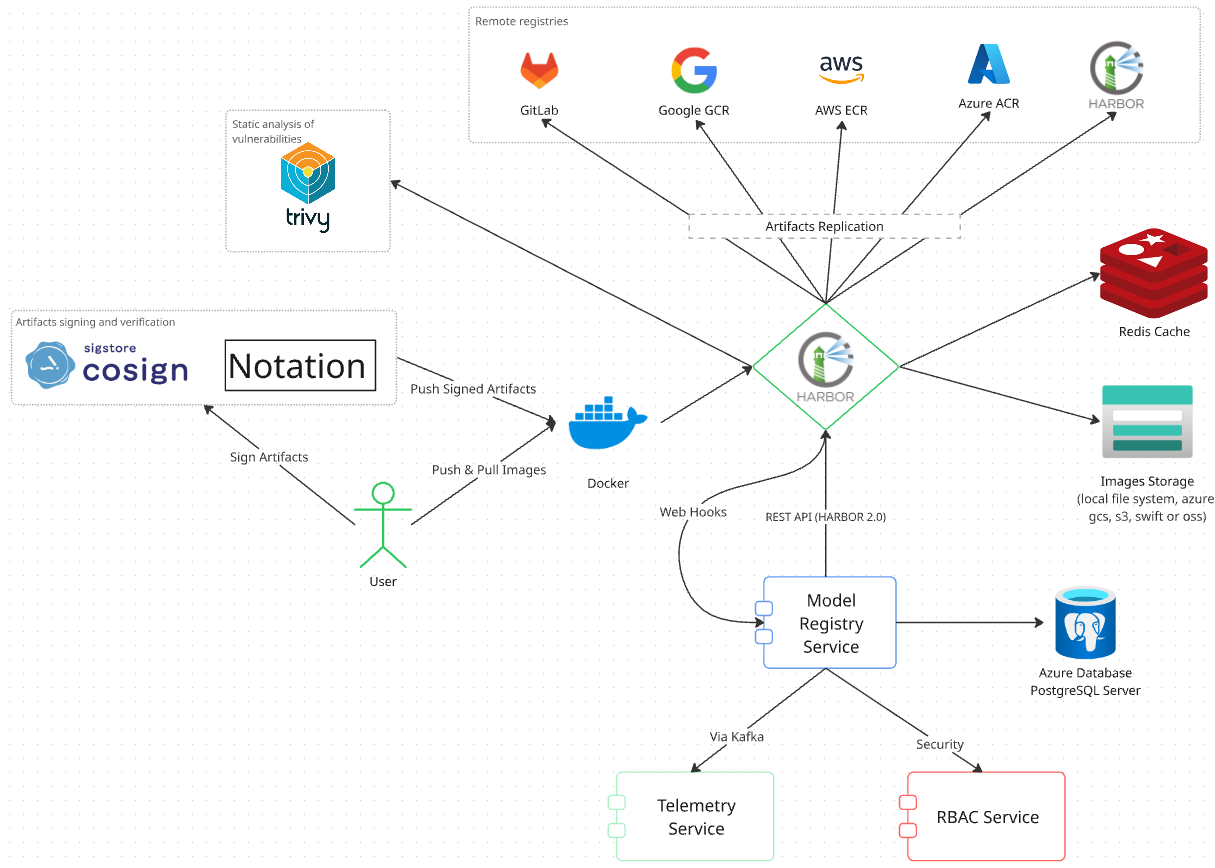
Key Features
- Clear models structure grouped by projects (tenants)
- Organized models life cycle control and versioning.
- Tracking information about models using Harbor web hooks
- Simplified and straightforward projects management through Harbor API
- Configurable and secure models sharing control via Harbor replication rules
- Configurable semi-automatic or automatic registry cleanup functionality
- Harbor in-built scanning and signing functionality with comprehensive reports providing with regard to a particular model version
- Role-based access control for all service data and actions
- RESTful API with consistent endpoints for all the functionality above
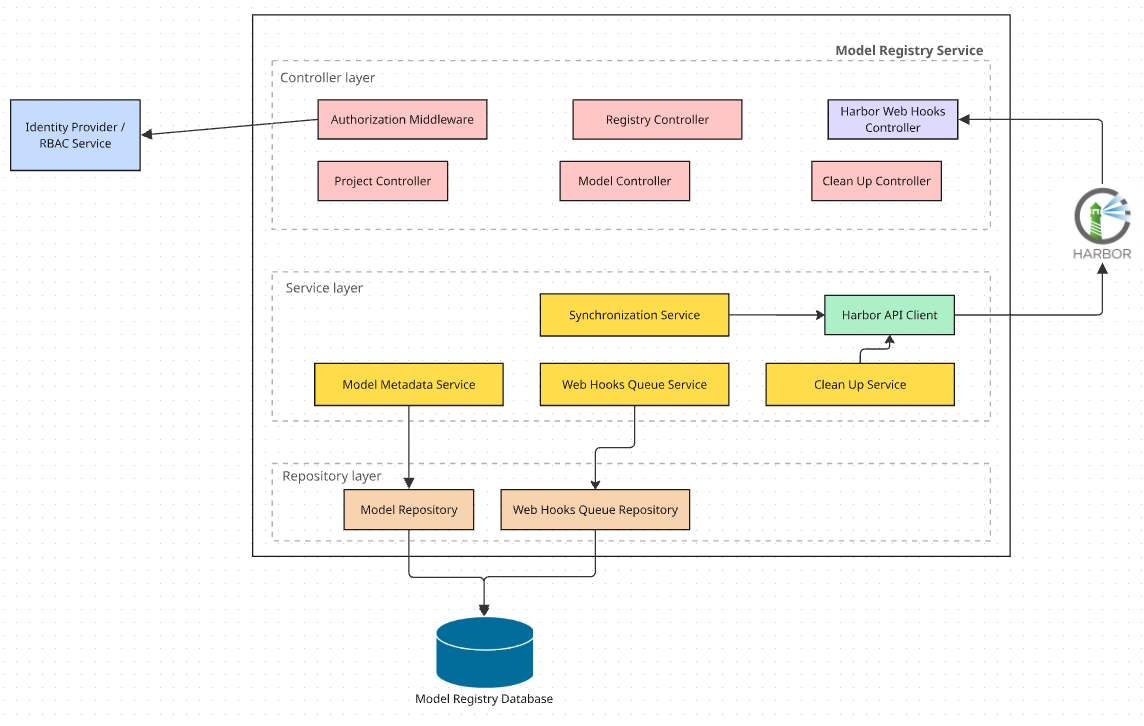
The Model Registry service represents a standalone web application based on a common multi-layered architecture that provides access to the specified functionality for other services and UI via gRPC and REST API.
Service Components
Components Diagram
| Component Name | Description |
|---|---|
| Authorization Middleware | The component that is used for authorization and secure execution of the service API methods. Uses an external PBAC service for user credentials verification. |
| Harbor Web Hooks Controller | The endpoint for catching all web hooks from the Harbor instance. Is a single way to retrieve the required information about changes in the Harbor registry. |
| Project Controller | The controller to manage projects. Simplifies creation and configuration of new Harbor projects. |
| Registry Controller | The controller to manage remote registries (endpoints) and establish links between model versions and remote registries. |
| Model Controller | The controller to manage models data. Allows to retrieve the models related information and track additional models versions/metadata, resource requirements, etc. |
| Checkpoint Controller | The controller to track model checkpoints. A checkpoint is linked to a model version entity and should refer to external or internal asset files. |
| Cleanup Controller | The controller for getting a list of outdated or obsolete models and model versions. Also allows to setup and run the supported cleanup activities in the local Harbor registry. |
| Audit Log Controller | Allows to get details about scanning and signing results for a particular model. |
| Users and Groups Controller | Provides the set of methods to manage project members, add and delete users accounts and their roles. |
| Synchronization Service | The component that allows updating the corresponding models data to keep it up to date. |
| Harbor API Client | The module that handles all interactions with the Harbor instance through its API and returns the received results. |
| Model Metadata Service | The service that is intended to extract the required metadata information from a model’s manifest to keep all the required data in the service database. |
| Web Hooks Queue Service | The service that processes the web hooks queue (a separate database table) in the service database in the background, parses all retrieved data from the harbor and updates the corresponding service records. |
| Cleanup Service | Implements the functionality that is required for the Cleanup Controller. Gathers and returns information about obsolete model versions and allows execution of the supported cleanup activities in the local Harbor registry. |
Integration with the Harbor Registry
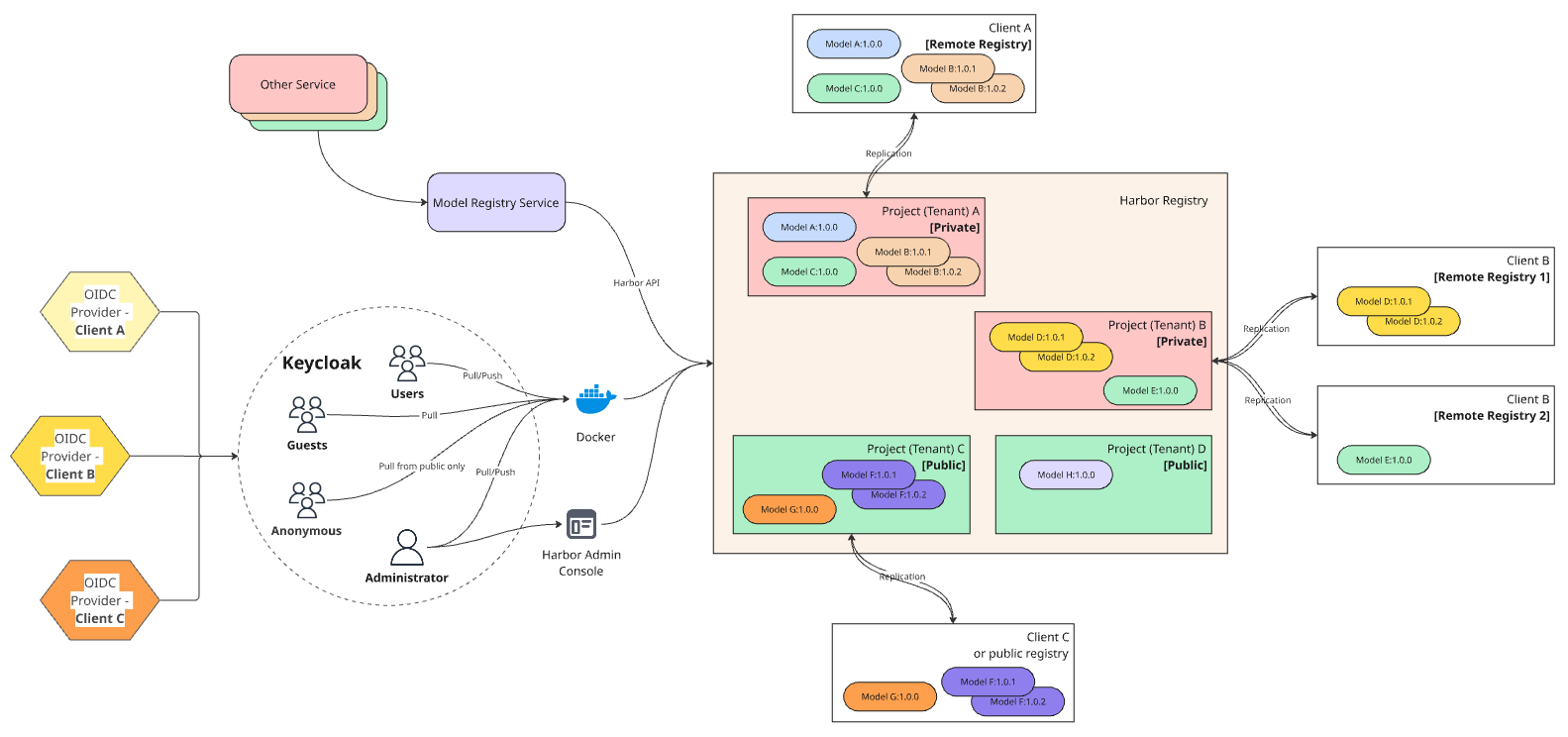
Integration with the Harbor can be organized in two possible ways listed below.
-
Single Harbor Instance Model
Advantages:
- Simple solution, since the Model Registry service interacts with the single Harbor instance and all users can login in a single Docker registry to obtain models
- Each client/tenant owns a project with models
- Public projects can contain shared models (resources)
Disadvantages:
- It’s impossible to support any nested levels such as client’s departments or teams since project is an indivisible entity in Harbor
- Need to separate all users from the Keycloak to individual projects to guarantee proper access control and make sure that each user can have access to an allowed set of models (project)
Advantages:
- More complex solution, since the Model Registry service has to manage multiple Harbor instances
- Each Harbor instance represents a particular tenant (client) in this case and there is a possibility to support one additional nested level and manage such entities as client’s departments or teams using separation by projects
- Public projects can contain shared models (resources)
- More reliable delimitation of users since all client’s users have their own instance with configured permissions
Disadvantages:
- Additional infrastructure costs to deploy and configure a separate Harbor instance for each client (tenant)
- Need to separate all users from the Keycloak to individual Harbor instances to guarantee proper access control and make sure that each user can have access to an allowed Harbor registry
At the current moment the single instance Harbor model looks more acceptable due to its simplicity and less efforts and costs to deploy and support it but multi instance Harbor model provides more abilities and more isolated users separation.
Synchronization with Remote Registries
Harbor projects regardless of their access level (public or private) can be created in usual or “proxy” mode. Proxy Harbor project is used to proxy and cache images from a target public or private registry. Regrettably “proxy” project type has a set of limitations that makes it not suitable for the project purposes:
- The “proxy” project does not have Deployment Security settings, i.e. it is not possible to enable the policy for obligatory images signing and prohibit usage and running not approved models by users
- According to the documentation Harbor only supports proxy caching for Docker Hub and Harbor registries. It is narrowing the list of possible integrations with other container registries.
- A proxy cache project works similarly to a normal Harbor project, except that you are not able to push images to a proxy cache project.
These limitations are significant and each of them is a sufficient reason to abandon usage of proxy cache projects. They can be useful to pull images from a target Harbor or non-Harbor registry in an environment with limited or no access to the internet. You can also use a proxy cache to limit the amount of requests made to a public registry, avoiding consuming too much bandwidth or being throttled by the registry server.
A typical Harbor project looks more interesting since it allows pulling and pushing images according to the user role, supports images signing and scanning and provides great replication possibilities for synchronization with remote registries of defined types.
There are two possible replication methods that are available in Harbor:
- Push-based - synchronizes the resources from the local Harbor registry to a remote registry.
- Pull-based - downloads the resources from the remote registry to the local Harbor registry.
Besides that it is possible to trigger both types of replication manually, based on the event, or by schedule which allows flexible configuration of models and their versions synchronization between local and remote registries. So, full-fledged typical Harbor project type with enabled forward and backward replication will cover all system needs of a fully functional images secure registry with ability to share models according to the specified rules.
Users and Access Management within a Multi-Tenant Environment
Since there is no Harbor API to directly create a user when OIDC authentication is enabled as this would bypass the OIDC provider. Instead of this it is necessary to focus on managing users and their attributes within the OIDC provider and then manage project roles via Harbor REST API after users have been onboarded.
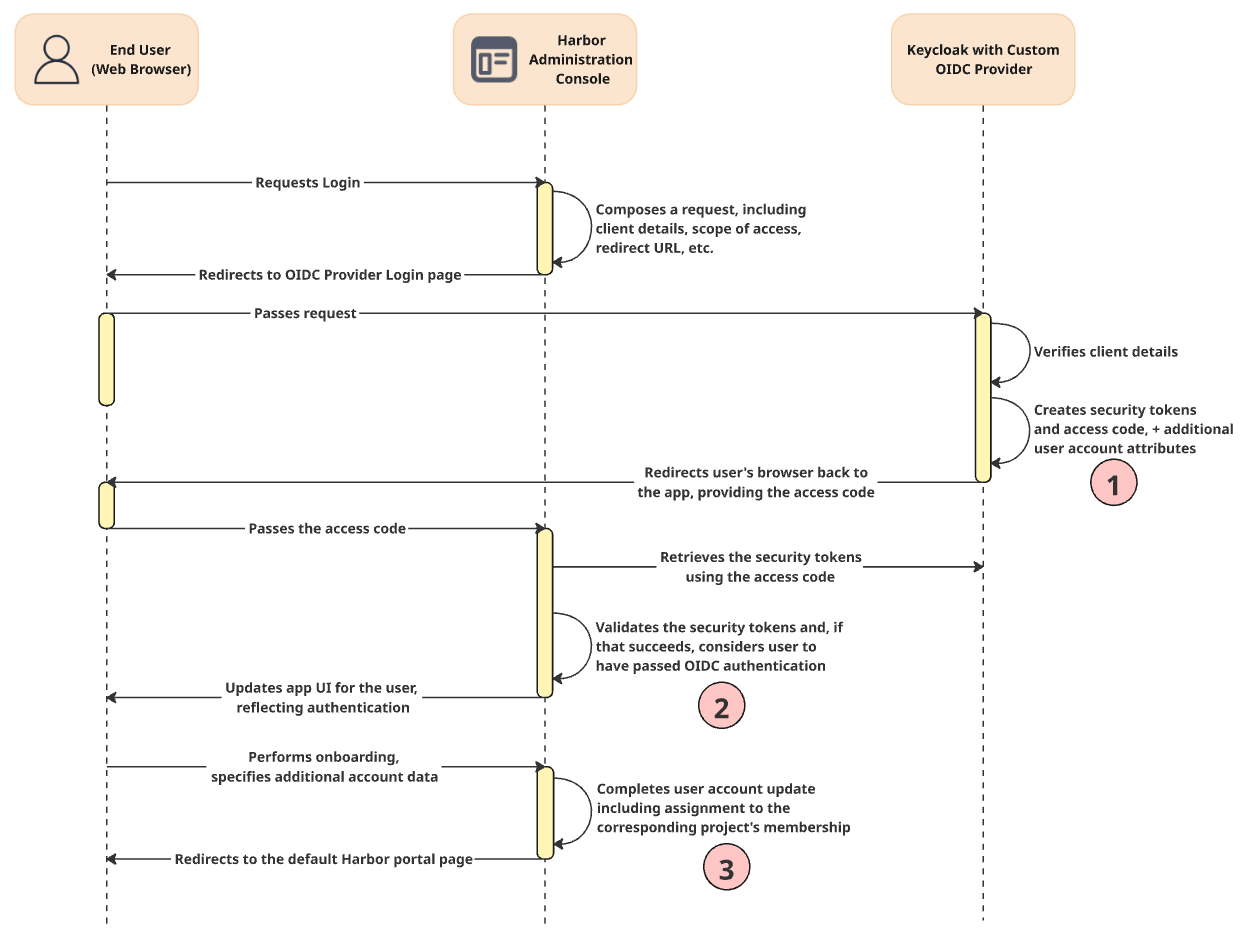
- Each tenant most likely has its own identity provider that could be registered in Keycloak as OIDC provider. Keycloak allows multiple providers and different flows of users could be separated using Groups Membership and exchange groups info through security tokens.
- Users groups are promoted automatically in Harbor and can be mapped with the corresponding roles to an appropriate project (tenant). Authenticated users that have been onboarded and automatically assigned to the project can use their credentials to connect to the Harbor registry through Docker CLI.
- The project and project’s membership must be configured preliminary to map new user accounts automatically.
The sequence diagram above depicts the user registration scenario which can be triggered by manual user sign-in event. To add a user who can access Harbor via OIDC, it is necessary to create that user account within an appropriate OIDC identity provider such as Keycloak, Okta, or Microsoft Entra, etc.
Robot Accounts for Scripting and Automation
Harbor allows you to use a system or project specific robot account to automate running operations for a project including:
- Push artifacts
- Pull artifacts
- Delete artifacts
- Read Helm charts
- Create a Helm chart version
- Delete a Helm chart version
- Create a tag
- Delete a tag
- Create artifact labels
- Create a scan
A project robot account authenticates to a Harbor instance using a secret, allowing you to connect to a Harbor instance through the OCI client or Harbor API to automate tasks.
Note: Robot Accounts cannot log in to the Harbor interface.
Temporal for Workflows Support
The purpose of Model Registry API methods is to provide a set of minimalistic and sufficient routines to the service clients for getting the required information and managing models and checkpoints.
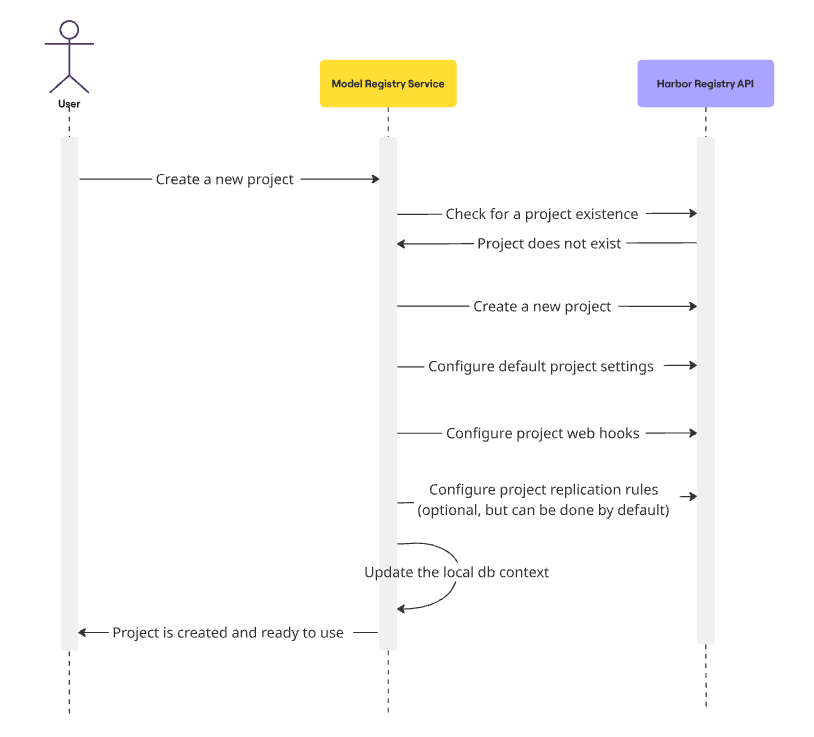
The sequence diagram for a new project creation also confirms that it is a good idea to implement this workflow using Temporal. The workflow consists of the set of sequential steps that should be executed one by one. Temporal will bring consistency, traceability and steadiness to faults to operations like this. Here is the sequential list of actions that must be applied on a new project registration:
| Action | Operator | Description |
|---|---|---|
| Add a new Identity provider to the Keycloak | Manually or CI/CD | The Identity provider will be used to add user accounts for a new project. The groups in the Keycloak should be properly configured to distinguish user roles in the Harbor. |
| Add a new project in Harbor | Model Registry | A new project creation and configuration via Harbor API: Check for the project existence Create a new common project (public or private on demand) Create and initialize the project’s membership, i.e. add the corresponding groups Update project settings, enable signing and scanning Web hooks setup to receive the notifications Replication rules setup to share models with remote registries (optional) Project robot accounts setup and configuration (optional) |
| Local DB context update | Model Registry | Track the corresponding changes in the local Postgres database |
| Sending an event to the Telemetry | Model Registry | Compose and send the corresponding message into a Kafka topic |
| User Sign-in in to the Harbor admin console | Manually by user | At this moment users should be able to sign in into the Harbor to obtain the user secret for further work with the Harbor registry |
Note
All steps related to the Model Registry service can be implemented using temporal.
Technical Implementation
Authentication and Authorization
All endpoints require JWT bearer token authentication with the following features:
- Token extraction from Authorization header
- JWT token validation and signature verification
- User context extraction from token claims
- Error handling for missing or invalid tokens
Also each API method can be executed if the external PBAC service approves the corresponding action for the current user which is authenticated using an appropriate token.
The full list of PBAC components is listed in the table below.
| Component Name | Description | Example |
|---|---|---|
| Tenant Name | Project/Tenant isolation identifier | acme-corp, beta-client |
| Service Name | Service unique identifier | model-registry |
| Model access type | Model classification | public/private |
| Model Name | A specific model identifier | Image-2-image, cogvideo2 |
| Model Version | A specific model identifier with pattern support (wildcards) | 0.1.2, 0.1.*, latest |
The list of expected service actions:
| Action Name | Description |
|---|---|
| projects.write | Allows to create a new projects and modify or remove existing |
| projects.read | Allows to get project related information |
| models.write | Allows to update the corresponding model data |
| models.read | Allows to retrieve the list of models and a detailed model versions data |
| registries.write | Allows to create new connections (endpoints) to remote registries |
| registries.read | Allows to retrieve the information about currently registered endpoints |
| checkpoints.write | Allows to add/modify new checkpoint records for a model version |
| checkpoints.read | Allows to get the list of registered checkpoints for a particular model version |
| audit.read | Allows to retrieve models audit information |
| cleanup.admin | Allows to schedule and run cleanup actions |
| cleanup.read | Allows to retrieve information about outdated models and versions |
| membership.admin | Allows to manage users data and groups |
Harbor Default Project Roles
| Role Name | Description |
|---|---|
| Project Admin | Project administrators also have some management privileges, such as adding and removing members, starting a vulnerability scan. |
| Maintainer | Maintainer has elevated permissions beyond those of ‘Developer’ including the ability to scan images, view replication jobs, and delete images and helm charts. |
| Developer | The developer has read and write privileges for a project. |
| Guest | Guests have read-only privilege for a specified project. They can pull and retag images, but cannot push. |
| Limited Guest | A Limited Guest does not have full read privileges for a project. They can pull images but cannot push, and they cannot see logs or the other members of a project. |
| System-level Roles | |
| System administrator | The harbor system administrator has the most privileges. In addition to the privileges mentioned above, “Harbor system administrator” can also list all projects, set an ordinary user as administrator, delete users and set vulnerability scan policy for all images. |
| Anonymous | When a user is not logged in, the user is considered as an “Anonymous” user. An anonymous user has no access to private projects and has read-only access to public projects. |
Data Source for Telemetry and/or Audit
The Harbor is producing the list of various events that could be interesting to track using the Telemetry and/or Audit services abilities. There are following event types that are available:
- Artifact deleted
- Artifact pulled
- Artifact pushed
- Quota exceed
- Quota near threshold
- Replication status changed
- Scanning failed
- Scanning finished
- Scanning stopped
- Tag retention finished
The Harbor can be configured to call a webhook and provide the information about an event from the list above in JSON format. As an alternative the Model Registry service can accept an event, process it and call the corresponding Telemetry service method and pass the required data in the suitable data format.
Here is the example of JSON data for an artifact deletion event:
{
   "time":"2025-08-14T09:07:55.915933862Z",
   "host":"ub24harbor.requestcatcher.com",
   "method":"POST",
   "path":"/test",
   "headers":{
      "Accept-Encoding":[
         "gzip"
      ],
      "Content-Length":[
         "363"
      ],
      "Content-Type":[
         "application/json"
      ],
      "User-Agent":[
         "Go-http-client/1.1"
      ]
   },
   "content_length":363,
   "remote_addr":"109.252.138.131",
   "form_values":null,
   "body":" ,\n    \"resources\": [\n       \n    ]\n  },\n  \"occur_at\": 1755162475,\n  \"operator\": \"admin\",\n  \"type\": \"DELETE_ARTIFACT\"\n}",
   "raw_request":"POST /test HTTP/1.1\r\nHost: ub24harbor.requestcatcher.com\r\nAccept-Encoding: gzip\r\nContent-Length: 363\r\nContent-Type: application/json\r\nUser-Agent: Go-http-client/1.1\r\n\r\n ],\"repository\": }}"
}
The event data contains information about occurred action, client details, repository, affected artifact, etc.
Note
You can configure the prometheus server to collect harbor metrics, and use grafana to visualize your data. To begin accessing your Harbor instance’s metrics with Prometheus it is necessary to enable and setup it in the harbor.yml configuration file and set the port and path for metrics to be exposed on. The Prometheus config file has to be updated as well to scrape Harbor metrics exposed.
Database Structure
The service database structure is shown in the following diagram:
Database Diagram in SQL DDL
-- DROP SCHEMA modelregistry;

CREATE SCHEMA modelregistry
AUTHORIZATION postgres;

-- ============================================================
-- model_types
-- ============================================================

CREATE TABLE modelregistry.model_types (
    id    int4         NOT NULL,
    code  varchar(150) NOT NULL,
    name  varchar(150) NOT NULL,
    CONSTRAINT "PK_model_types"
        PRIMARY KEY (id)
);

CREATE UNIQUE INDEX "IX_model_types_name"
    ON modelregistry.model_types (name);

CREATE UNIQUE INDEX ux_model_type_name_and_code
    ON modelregistry.model_types (name, code);

-- ============================================================
-- signature_types
-- ============================================================

CREATE TABLE modelregistry.signature_types (
    id    int4         NOT NULL,
    code  varchar(150) NOT NULL,
    name  varchar(150) NOT NULL,
    CONSTRAINT "PK_signature_types"
        PRIMARY KEY (id)
);

CREATE UNIQUE INDEX "IX_signature_types_name"
    ON modelregistry.signature_types (name);

CREATE UNIQUE INDEX ux_signature_type_name_and_code
    ON modelregistry.signature_types (name, code);


-- ============================================================
-- validation_statuses
-- ============================================================

CREATE TABLE modelregistry.validation_statuses (
    id    int4         NOT NULL,
    name  varchar(150) NOT NULL,
    CONSTRAINT "PK_validation_statuses"
        PRIMARY KEY (id)
);

CREATE UNIQUE INDEX ux_image_status_name
    ON modelregistry.validation_statuses (name);

-- ============================================================
-- projects
-- ============================================================

CREATE TABLE modelregistry.projects (
    id           uuid        NOT NULL,
    name         varchar     NOT NULL,
    display_name varchar     NOT NULL,
    description  varchar     NULL,
    is_public    bool        NOT NULL DEFAULT false,
    harbor_id    int4        NULL,
    tenant_id    varchar     NOT NULL,
    "user"       text        NULL,
    is_archived  bool        NOT NULL,
    deleted_at   timestamptz NOT NULL DEFAULT '-infinity',
    CONSTRAINT "PK_projects"
        PRIMARY KEY (id),
);

-- ============================================================
-- repositories
-- ============================================================

CREATE TABLE modelregistry.repositories (
    id              uuid        NOT NULL,
    name            varchar     NOT NULL,
    namespace       varchar     NOT NULL,
    full_name       varchar     NOT NULL,
    harbor_id       int4        NULL,
    project_id      uuid        NOT NULL,
    "user"          text        NULL,
    is_archived     bool        NOT NULL,
    harbor_address  varchar     NOT NULL DEFAULT '',
    deleted_at      timestamptz NOT NULL DEFAULT '-infinity',
    CONSTRAINT "PK_repositories"
        PRIMARY KEY (id),
    CONSTRAINT "FK_repositories_projects_project_id"
        FOREIGN KEY (project_id)
        REFERENCES modelregistry.projects (id)
        ON DELETE CASCADE
);

CREATE INDEX "IX_repositories_project_id"
    ON modelregistry.repositories (project_id);

CREATE UNIQUE INDEX ux_repository_name_project
    ON modelregistry.repositories (
        name,
        namespace,
        project_id,
        is_archived,
        deleted_at
    );

-- ============================================================
-- models
-- ============================================================

CREATE TABLE modelregistry.models (
    id             uuid        NOT NULL,
    name           varchar     NOT NULL,
    display_name   varchar     NULL,
    description    varchar     NULL,
    author         varchar     NULL,
    organization   varchar     NULL,
    url            varchar     NULL,
    type_id        int4        NOT NULL DEFAULT 0,
    project_id     uuid        NOT NULL,
    repository_id  uuid        NOT NULL,
    "user"         text        NULL,
    is_archived    bool        NOT NULL,
    deleted_at     timestamptz NOT NULL DEFAULT '-infinity',
    creation_date  timestamptz NULL,
    license        varchar     NULL,
    tags           _text       NULL,
    CONSTRAINT "PK_models"
        PRIMARY KEY (id),
    CONSTRAINT "FK_models_model_types_type_id"
        FOREIGN KEY (type_id)
        REFERENCES modelregistry.model_types (id)
        ON DELETE CASCADE,
    CONSTRAINT "FK_models_projects_project_id"
        FOREIGN KEY (project_id)
        REFERENCES modelregistry.projects (id)
        ON DELETE CASCADE,
    CONSTRAINT "FK_models_repositories_repository_id"
        FOREIGN KEY (repository_id)
        REFERENCES modelregistry.repositories (id)
        ON DELETE CASCADE
);

-- ============================================================
-- images
-- ============================================================

CREATE TABLE modelregistry.images (
    id            uuid        NOT NULL,
    digest        varchar     NOT NULL,
    harbor_id     int4        NULL,
    model_id      uuid        NOT NULL,
    repository_id uuid        NOT NULL,
    "user"        text        NULL,
    is_archived   bool        NOT NULL,
    is_approved   bool        NOT NULL DEFAULT false,
    is_verified   bool        NOT NULL DEFAULT false,
    deleted_at    timestamptz NOT NULL DEFAULT '-infinity',
    CONSTRAINT "PK_images"
        PRIMARY KEY (id),
    CONSTRAINT "FK_images_models_model_id"
        FOREIGN KEY (model_id)
        REFERENCES modelregistry.models (id)
        ON DELETE CASCADE,
    CONSTRAINT "FK_images_repositories_repository_id"
        FOREIGN KEY (repository_id)
        REFERENCES modelregistry.repositories (id)
        ON DELETE CASCADE
);

-- ============================================================
-- manifests
-- ============================================================

CREATE TABLE modelregistry.manifests (
    id          uuid        NOT NULL,
    content     varchar     NOT NULL,
    tag         varchar     NOT NULL,
    image_id    uuid        NOT NULL,
    "user"      text        NULL,
    is_archived bool        NOT NULL,
    deleted_at  timestamptz NOT NULL DEFAULT '-infinity',
    CONSTRAINT "PK_manifests"
        PRIMARY KEY (id),
    CONSTRAINT "FK_manifests_images_image_id"
        FOREIGN KEY (image_id)
        REFERENCES modelregistry.images (id)
        ON DELETE CASCADE
);

-- ============================================================
-- metadata
-- ============================================================

CREATE TABLE modelregistry.metadata (
    id          uuid        NOT NULL,
    name        varchar     NOT NULL,
    value       varchar     NULL,
    model_id    uuid        NOT NULL,
    image_id    uuid        NULL,
    parent_id   uuid        NULL,
    "user"      text        NULL,
    is_archived bool        NOT NULL,
    deleted_at  timestamptz NOT NULL DEFAULT '-infinity',
    CONSTRAINT "PK_metadata"
        PRIMARY KEY (id),
    CONSTRAINT "FK_metadata_images_image_id"
        FOREIGN KEY (image_id)
        REFERENCES modelregistry.images (id),
    CONSTRAINT "FK_metadata_metadata_parent_id"
        FOREIGN KEY (parent_id)
        REFERENCES modelregistry.metadata (id)
        ON DELETE CASCADE,
    CONSTRAINT "FK_metadata_models_model_id"
        FOREIGN KEY (model_id)
        REFERENCES modelregistry.models (id)
        ON DELETE CASCADE
);

-- ============================================================
-- signatures
-- ============================================================

CREATE TABLE modelregistry.signatures (
    id              uuid        NOT NULL,
    digest          varchar     NOT NULL,
    type_id         int4        NOT NULL,
    harbor_id       int4        NULL,
    image_id        uuid        NULL,
    repository_id   uuid        NOT NULL,
    "user"          text        NULL,
    is_archived     bool        NOT NULL,
    artifact_digest varchar     NULL,
    artifact_id     int4        NULL,
    artifact_repo   varchar     NULL,
    deleted_at      timestamptz NOT NULL DEFAULT '-infinity',
    CONSTRAINT "PK_signatures"
        PRIMARY KEY (id),
    CONSTRAINT "FK_signatures_images_image_id"
        FOREIGN KEY (image_id)
        REFERENCES modelregistry.images (id)
        ON DELETE CASCADE,
    CONSTRAINT "FK_signatures_repositories_repository_id"
        FOREIGN KEY (repository_id)
        REFERENCES modelregistry.repositories (id)
        ON DELETE CASCADE,
    CONSTRAINT "FK_signatures_signature_types_type_id"
        FOREIGN KEY (type_id)
        REFERENCES modelregistry.signature_types (id)
        ON DELETE CASCADE
);

-- ============================================================
-- tags
-- ============================================================

CREATE TABLE modelregistry.tags (
    id          uuid        NOT NULL,
    name        varchar     NOT NULL,
    harbor_id   int4        NULL,
    image_id    uuid        NOT NULL,
    "user"      text        NULL,
    is_archived bool        NOT NULL,
    deleted_at  timestamptz NOT NULL DEFAULT '-infinity',
    CONSTRAINT "PK_tags"
        PRIMARY KEY (id),
    CONSTRAINT "FK_tags_images_image_id"
        FOREIGN KEY (image_id)
        REFERENCES modelregistry.images (id)
        ON DELETE CASCADE
);

-- ============================================================
-- validation_results
-- ============================================================

CREATE TABLE modelregistry.validation_results (
    id               uuid        NOT NULL,
    repository_id    uuid        NOT NULL,
    image_id         uuid        NULL,
    tag              varchar     NOT NULL,
    report_ref       varchar     NULL,
    scanner_name     varchar     NULL,
    scan_status      varchar     NULL,
    scan_severity    varchar     NULL,
    scan_summary     varchar     NULL,
    scan_type        varchar     NOT NULL DEFAULT '',
    start_time       timestamptz NULL,
    end_time         timestamptz NULL,
    xumi_status      varchar     NULL,
    xumi_summary     varchar     NULL,
    xumi_start_time  timestamptz NULL,
    xumi_end_time    timestamptz NULL,
    status_id        int4        NOT NULL DEFAULT 0,
    error_message    varchar     NULL,
    error_details    varchar     NULL,
    "user"           text        NULL,
    is_archived      bool        NOT NULL,
    deleted_at       timestamptz NOT NULL DEFAULT '-infinity',
    CONSTRAINT "PK_validation_results"
        PRIMARY KEY (id),
    CONSTRAINT "FK_validation_results_images_image_id"
        FOREIGN KEY (image_id)
        REFERENCES modelregistry.images (id)
        ON DELETE SET NULL,
    CONSTRAINT "FK_validation_results_repositories_repository_id"
        FOREIGN KEY (repository_id)
        REFERENCES modelregistry.repositories (id)
        ON DELETE CASCADE,
    CONSTRAINT "FK_validation_results_validation_statuses_status_id"
        FOREIGN KEY (status_id)
        REFERENCES modelregistry.validation_statuses (id)
        ON DELETE CASCADE
);