Working with Sentry Replay
Overview
When a user reports that something is broken, the hardest part is often not fixing the issue — it is understanding what actually happened.
This is where Sentry Replay becomes invaluable.
Instead of interpreting second-hand descriptions, Replay allows you to step into the user’s experience and follow their journey as it happened. You can see where they clicked, how they navigated, and where things started to go wrong. It turns abstract problems into something concrete and observable.
When Replay Becomes Essential
There are moments when a ticket simply does not tell you enough. The user might say “it doesn’t work” or describe something that cannot be reproduced on your side.
In these situations, Replay provides clarity.
You open the session and suddenly the story unfolds — what the user tried, what they expected, and where the system failed them. Sometimes the issue becomes obvious within seconds. Other times, it reveals something subtle: hesitation, repeated clicks, or a delay that created confusion.
Replay is not just for confirming bugs. It is just as useful for understanding friction, miscommunication, and edge cases that logs alone cannot explain.
Entering the User’s Session
Replay link is attached to an issue report by a feedback form:
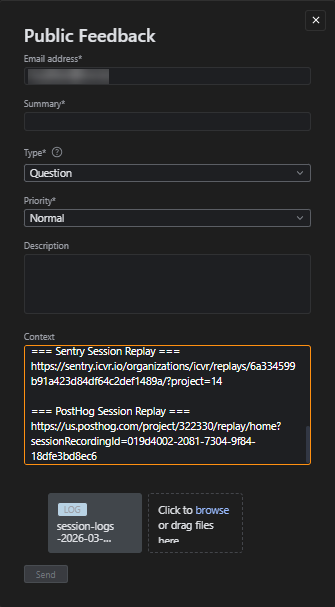
Once you open a session, resist the urge to jump straight to the error. Start a little earlier. Watch the user arrive at that moment. Follow their path. Notice how they move through the interface, what they focus on, and whether anything seems unclear or unexpected. These few extra seconds often explain more than the error itself.
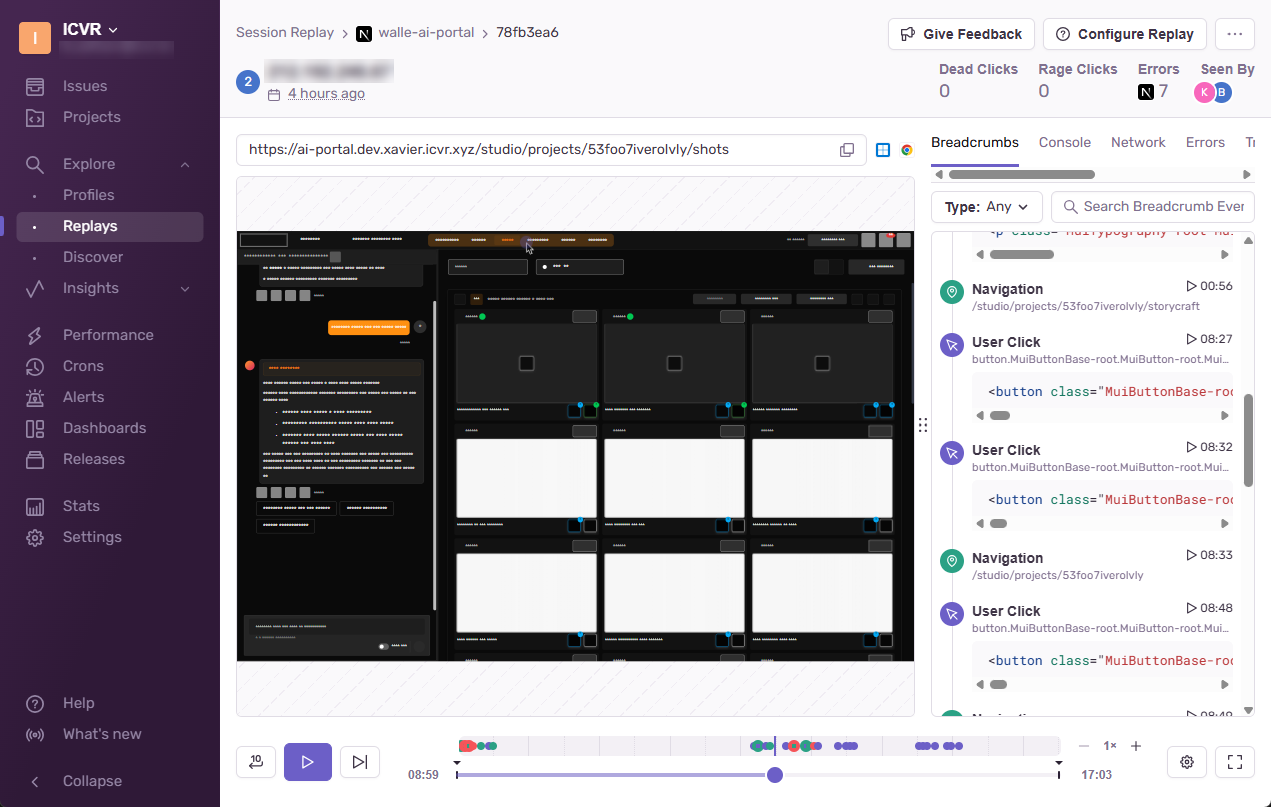
Watching the Problem Unfold
As the session progresses, there is usually a point where something changes. A button does nothing. A page stops responding. An action completes without feedback.
This is the moment you are looking for.
But the visible issue is only part of the story. Alongside the replay, there are quiet signals running in the background — network requests, console messages, linked errors. These are often where the real explanation lives.
A failed request, a delayed response, or a warning in the console can quickly reveal whether the issue comes from the frontend, the backend, or something in between.
Understanding What Really Happened
Not every issue is a bug.
Sometimes the system works exactly as designed, but the user is left uncertain about what to do next. You might see them repeating the same action, hesitating, or trying different paths to achieve the same goal. These moments are just as important as technical failures.
Replay helps you recognize the difference between something that is broken and something that is confusing.
Over time, you begin to see patterns. Certain flows cause hesitation. Certain actions lead to repeated attempts. These insights are valuable not only for resolving tickets but also for improving the product itself.
Making Sense of the Outcome
After reviewing a replay, your goal is to reach a clear conclusion.
Sometimes the path leads directly to a reproducible bug. Other times, it points to a specific browser, account state, or configuration. And occasionally, the replay simply does not provide enough information to be certain.
What matters is that your conclusion is grounded in what you observed, not in assumptions.
Communicating What You Found
A good escalation tells a short, precise story.
It describes what the user did, what the system returned, and where the breakdown occurred. When written well, it allows engineers to understand the issue without watching the replay themselves.
Example
- The user opens the image chat for a shot.
- After clicking Generate, no feedback appears.
- The replay shows a failed request to
/api/chatafter a delay of several seconds. - A console warning appears just before the interface becomes unresponsive.
This kind of summary replaces ambiguity with clarity. It connects user behavior with technical evidence.
Respecting Privacy by Design
One thing you will notice while working with Replay is that some information is missing. Text fields may be masked, and certain elements may not appear at all. This is intentional.
Privacy note
Replay is designed to protect user data by default.
Sensitive inputs are hidden, and not all content is recorded.
Rather than seeing this as a limitation, it should be treated as part of the system’s design. Your role is to work with the available context, not to depend on sensitive information.