Project Settings
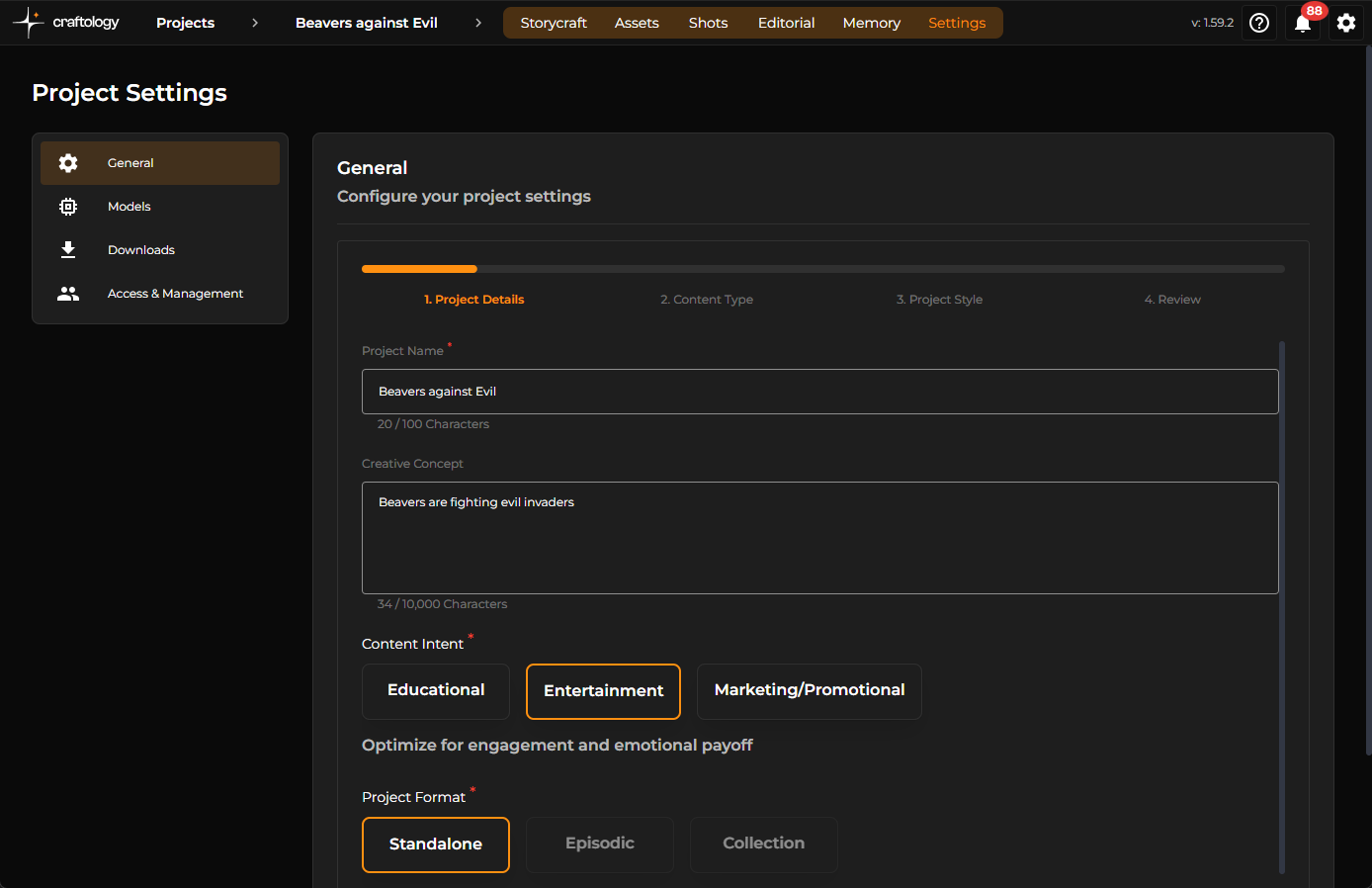
The Settings area in Craftology gives project owners and collaborators a centralized place to configure how a project behaves behind the scenes. From defining the creative direction of a production to controlling default AI models, download naming conventions, and team access, these settings shape the overall workflow experience for the entire project.
The Settings section is organized into four primary areas:
- General
- Models
- Downloads
- Access & Management
Naming System - the Downloads section
Instead of relying on inconsistent or generic filenames, Craftology provides a powerful token-based naming system that automatically generates structured, scalable, and production-ready filenames for every asset and shot. This helps teams maintain organized media pipelines, cleaner version control, and consistent naming standards across complex productions. Review the Downloads section for more information.
Navigating the Settings Area
Settings can be accessed directly from the top project navigation bar. Once opened, a left-hand sidebar provides quick access to each configuration category.
The interface is intentionally minimal and distraction-free, allowing teams to focus on operational setup without losing context of the active project. Changes are typically saved inline or through dedicated save actions depending on the configuration type.
General Settings
At the top of the page, Craftology presents a guided configuration flow that walks users through the core setup stages of a project. This step-based layout helps ensure that important creative information is established early before production assets begin accumulating.
The setup flow is organized into four progressive stages:
- Project Details
- Content Type
- Project Style
- Review
Project Details
The first stage focuses on defining the core identity of the production.
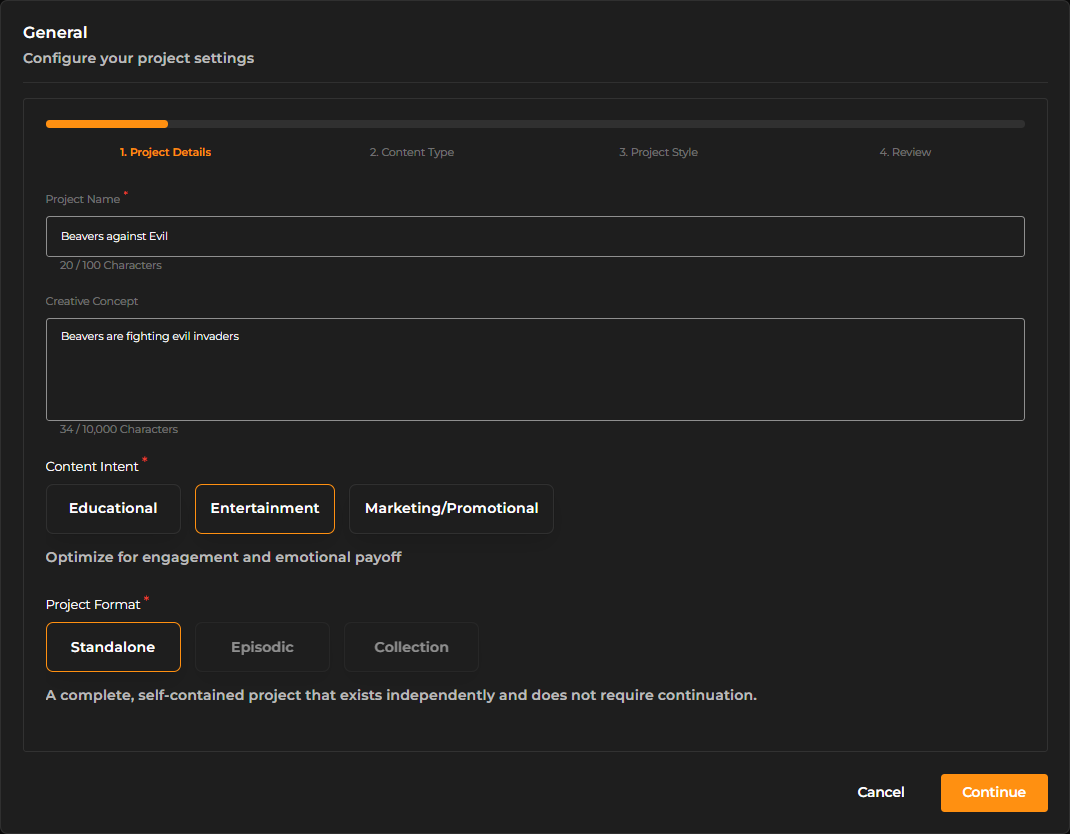
The Project Name becomes the primary label used throughout Craftology and appears across navigation, organization systems, exports, and collaboration tools.
Below that, the Creative Concept field gives teams space to describe the story, campaign, or creative vision in natural language. This description helps maintain alignment between collaborators and also provides additional context for AI-assisted creative workflows.
Creators can then establish the project’s Content Intent, allowing the platform to better understand the purpose of the production. Entertainment-focused projects may prioritize emotional engagement and cinematic storytelling, while educational or marketing projects may emphasize clarity, messaging, or instructional pacing.
The setup also introduces Project Format, which defines how the project is intended to exist structurally. Standalone projects are treated as complete self-contained experiences, while episodic and collection-based formats support serialized or grouped storytelling approaches.
Rather than forcing technical production terminology onto creators, Craftology presents these options in a conversational and approachable way, helping teams quickly understand the creative implications of each selection.
Content Type
The second stage focuses on how the project will ultimately be consumed by audiences.
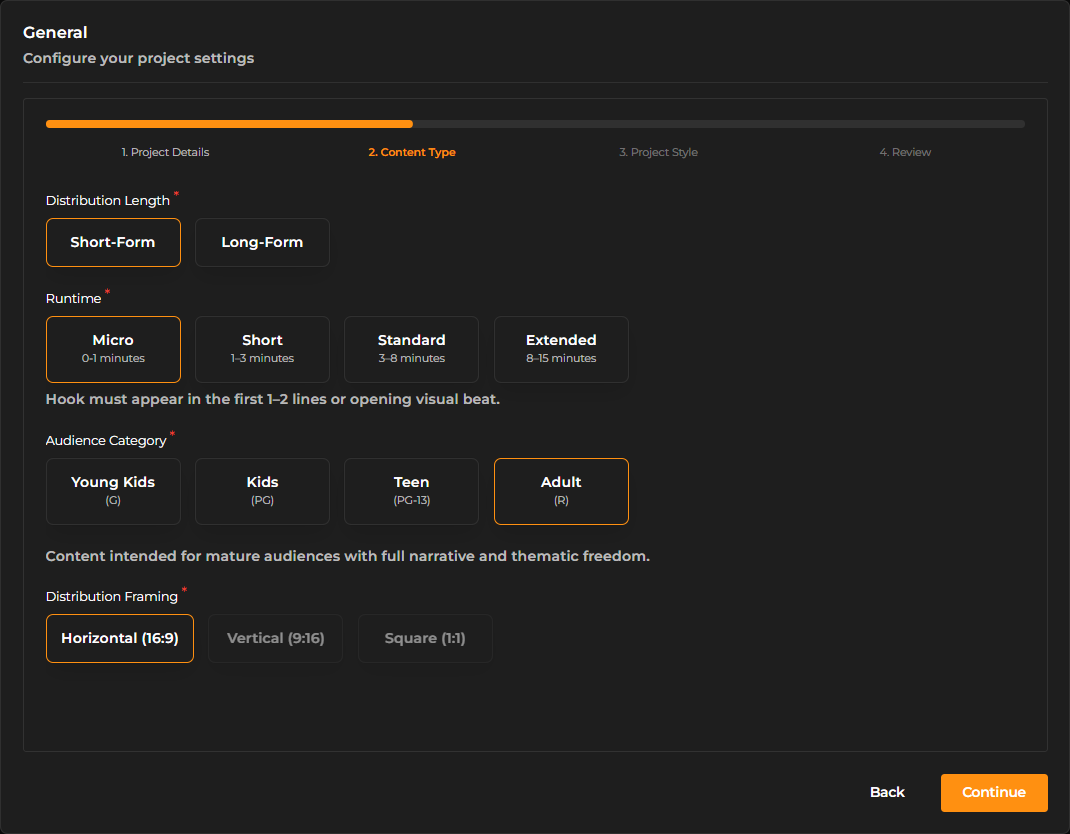
Craftology first asks creators to define the intended Distribution Length. Short-form projects are optimized for quick engagement and rapid storytelling, while long-form projects support more developed narrative structures and pacing.
The selected runtime category further refines this behavior. Micro runtimes prioritize immediate hooks and condensed storytelling, while extended runtimes allow for slower narrative progression and deeper audience immersion.
Audience targeting is also incorporated directly into project setup through the Audience Category selection. Rather than relying solely on abstract metadata, Craftology uses familiar audience classifications such as young kids, teen, or adult audiences to help shape tone and stylistic recommendations throughout the platform.
The Distribution Framing option determines the primary aspect ratio and viewing orientation of the project. Horizontal framing supports cinematic and traditional video experiences, while vertical and square layouts are optimized for mobile-first and social distribution channels.
Project Style
The third stage defines the visual personality of the production.
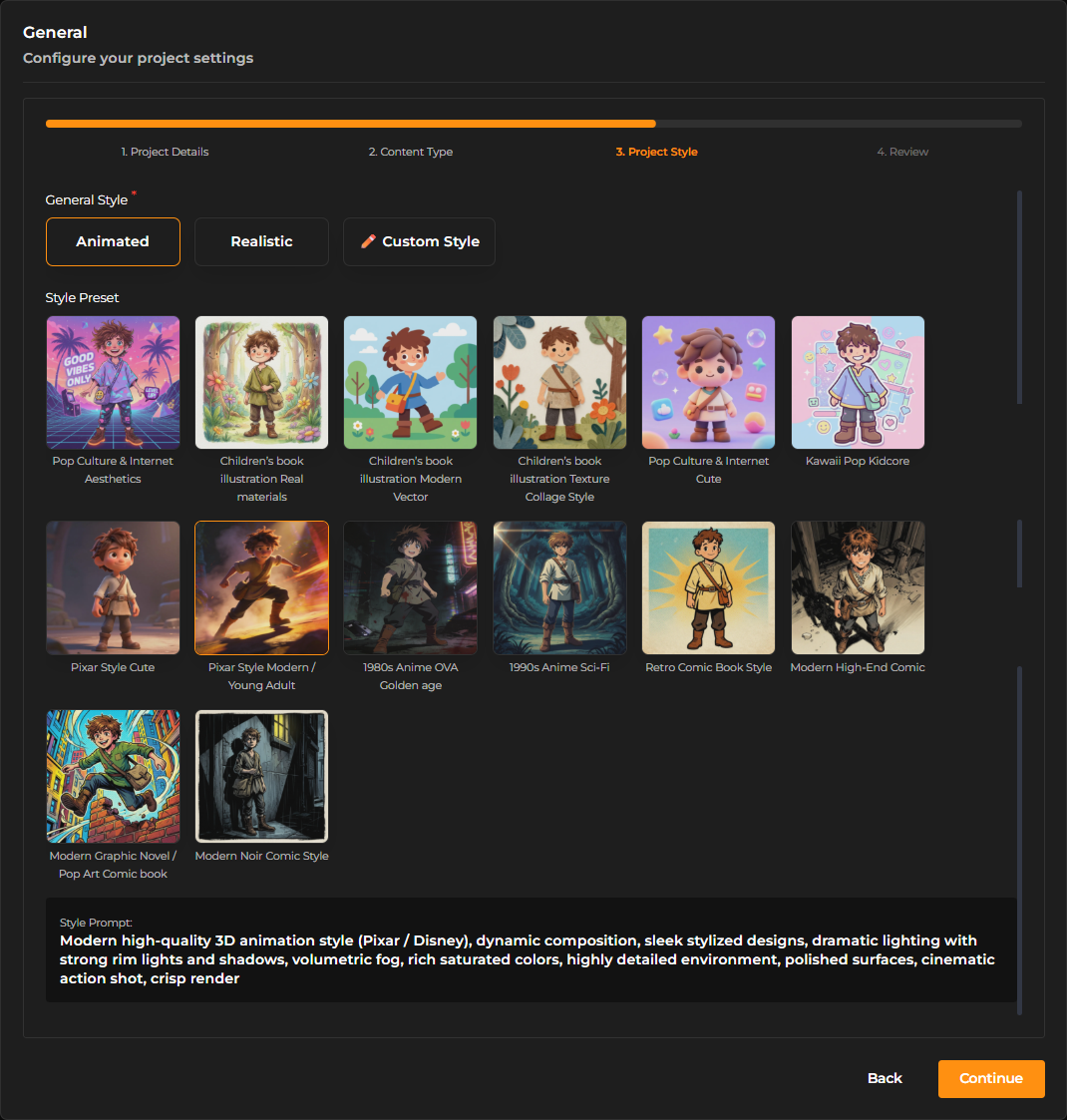
Craftology allows creators to choose between broader stylistic directions such as animated or realistic visuals, while also supporting fully custom visual styles for more advanced creative control.
Once a general style direction is selected, the platform presents a collection of Style Presets. These presets act as visual starting points that help establish consistency across generated assets, shots, and scenes.
The presets range from playful children’s illustration aesthetics to cinematic anime-inspired looks, retro comic-book treatments, modern graphic novel styles, and polished high-end animated renders. Each preset includes a visual preview, making style selection feel more intuitive and artist-driven rather than purely technical.
As styles are selected, Craftology dynamically generates a detailed Style Prompt beneath the preset gallery. This prompt describes the underlying artistic characteristics being applied, including rendering quality, lighting behavior, composition style, color treatment, atmosphere, and cinematic tone.
Review and Confirmation
The final stage provides a consolidated review of all project configuration choices before they are saved.
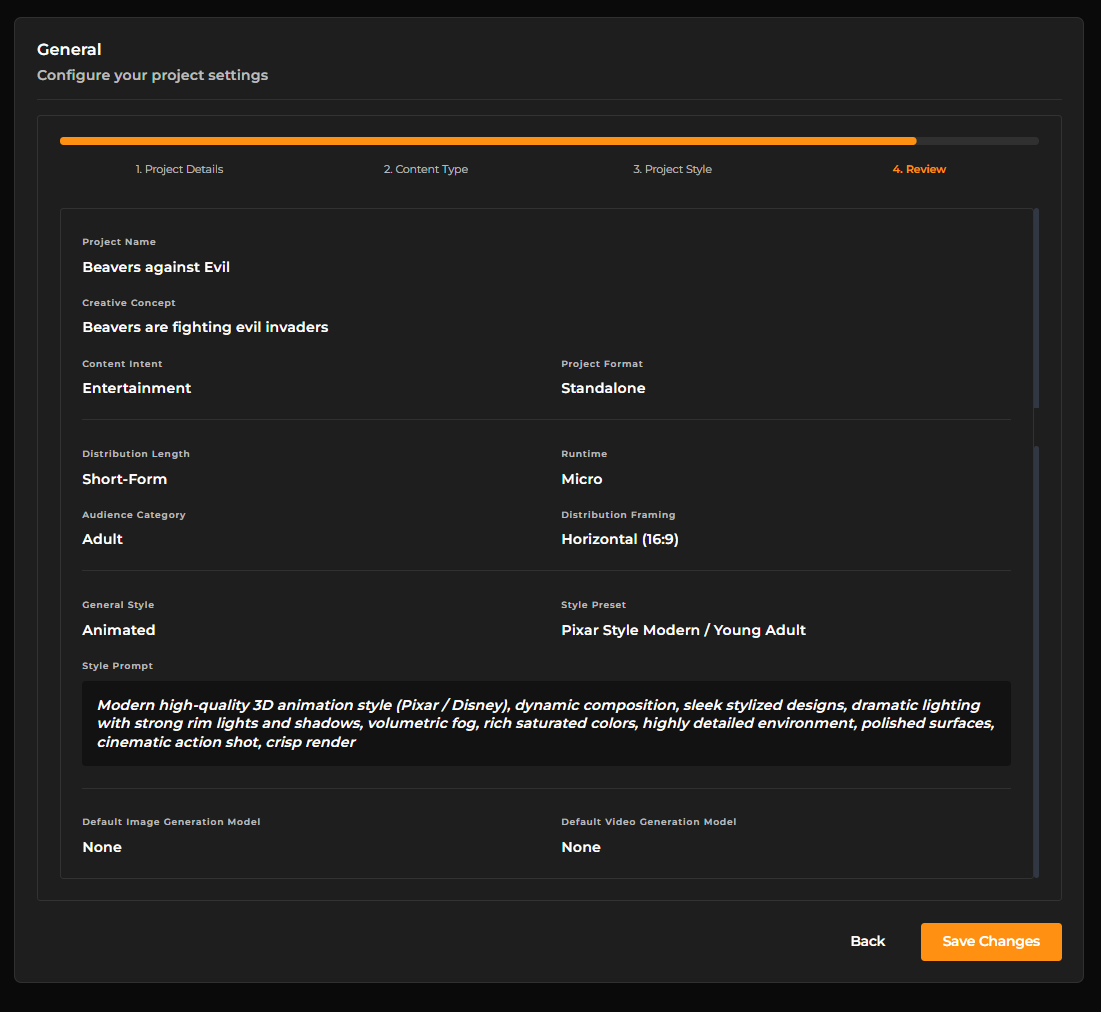
Rather than requiring creators to revisit multiple menus, Craftology presents a clean summary of the project’s creative profile in a single view. This includes the project identity, audience targeting, runtime strategy, framing format, and selected visual style.
The review screen acts as a final validation step before production begins, helping teams confirm that the project’s creative direction, technical configuration, and stylistic intent are fully aligned.
Models
The Models section controls the default AI services used whenever new image or video cards are created inside the project.
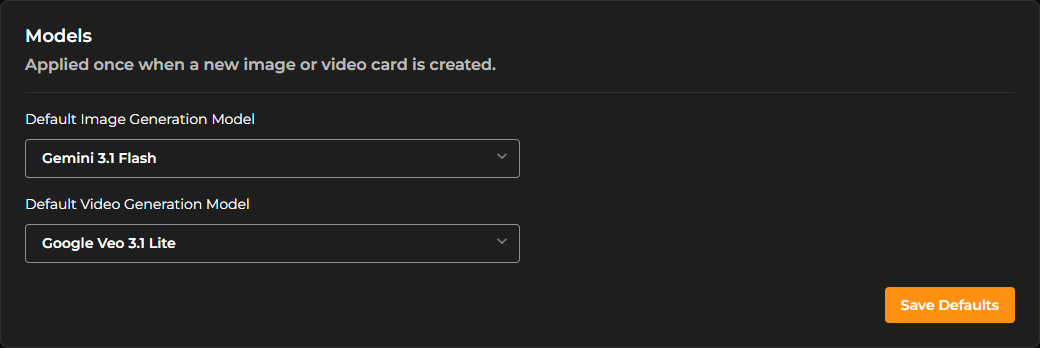
Instead of requiring creators to repeatedly choose generation engines during production, Craftology allows preferred defaults to be configured at the project level. This creates consistency across teams and reduces repetitive setup work.
The Default Image Generation Model determines which AI engine is automatically selected for image-based content generation tasks.
Similarly, the Default Video Generation Model establishes the standard engine used for video creation workflows.
These defaults only affect newly created assets and shots, making it possible to evolve project standards over time without disrupting existing content.
Downloads
The Downloads section controls how exported files are named when assets or rendered shots are downloaded from the platform.
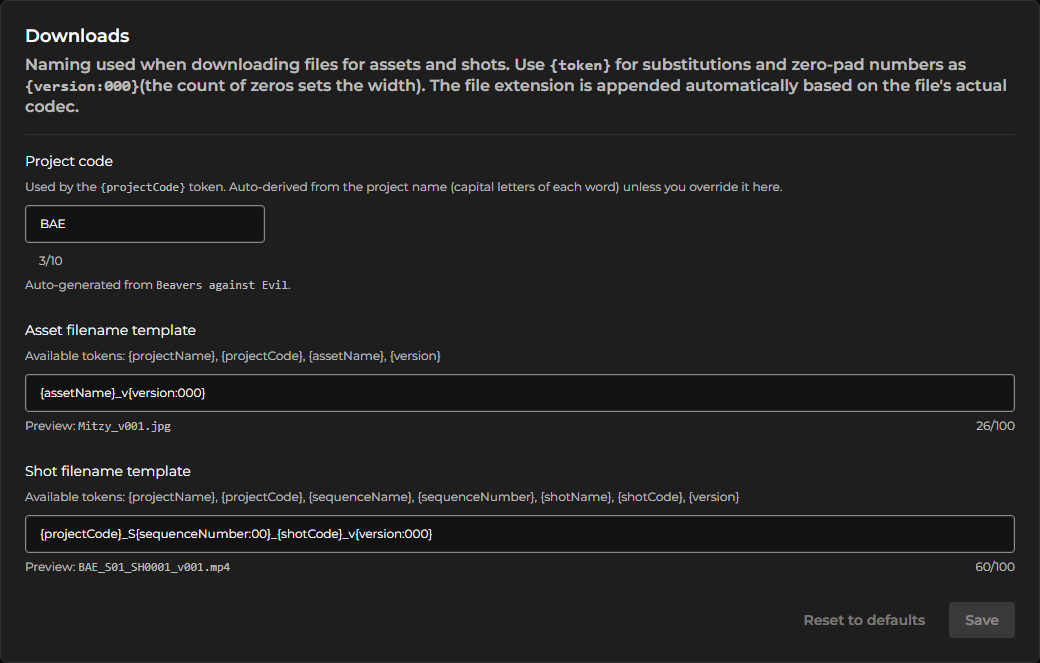
The Project Code field acts as a shorthand identifier for the project. By default, Craftology derives this value from the capital letters of the project name, though teams can customize it when needed.
This project code can then be reused throughout filename templates using token substitution.
For asset exports, creators can define an Asset Filename Template using available placeholders such as:
{projectName}{projectCode}{assetName}{version}
As templates are edited, Craftology immediately displays a live preview beneath the field so teams can verify naming conventions before saving changes.
Shot downloads follow a similar structure but support additional cinematic metadata such as sequence names, shot codes, and sequence numbers. This makes the system particularly effective for animation, VFX, editorial, and large-scale media productions where file organization becomes increasingly important over time.
The templating engine also supports zero-padded version formatting, helping exported files remain correctly sorted across operating systems and production pipelines.
Access & Management
The Access & Management section provides project-level collaboration controls.
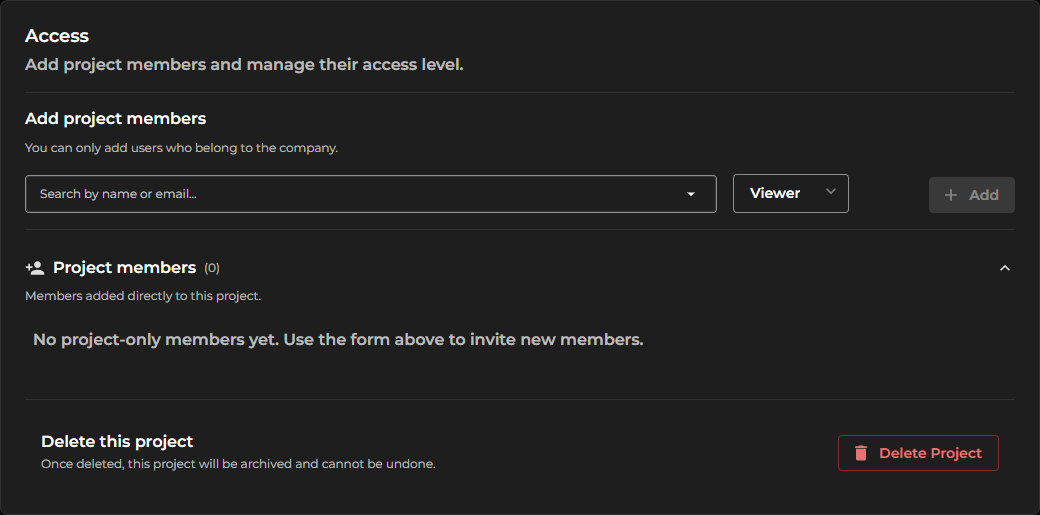
This area allows administrators to invite company members into a project while assigning specific permission levels. Access roles help ensure that contributors only interact with the parts of the project relevant to their responsibilities.
Adding members is designed to be fast and lightweight. Users can be selected from the company directory, assigned a role, and added directly into the project workspace.
Craftology also separates project-specific membership from broader company access, giving teams greater flexibility when managing temporary collaborators or production-specific contributors.
Below the member management area, the platform displays all users who currently have direct access to the project.
At the bottom of the page, project owners also have access to destructive administrative actions such as project deletion. Because deletion permanently archives the project and cannot be undone, these actions are intentionally isolated visually from standard configuration tools.