Feature Flags
GitLab Feature Flags via Kubernetes Operator
Overview
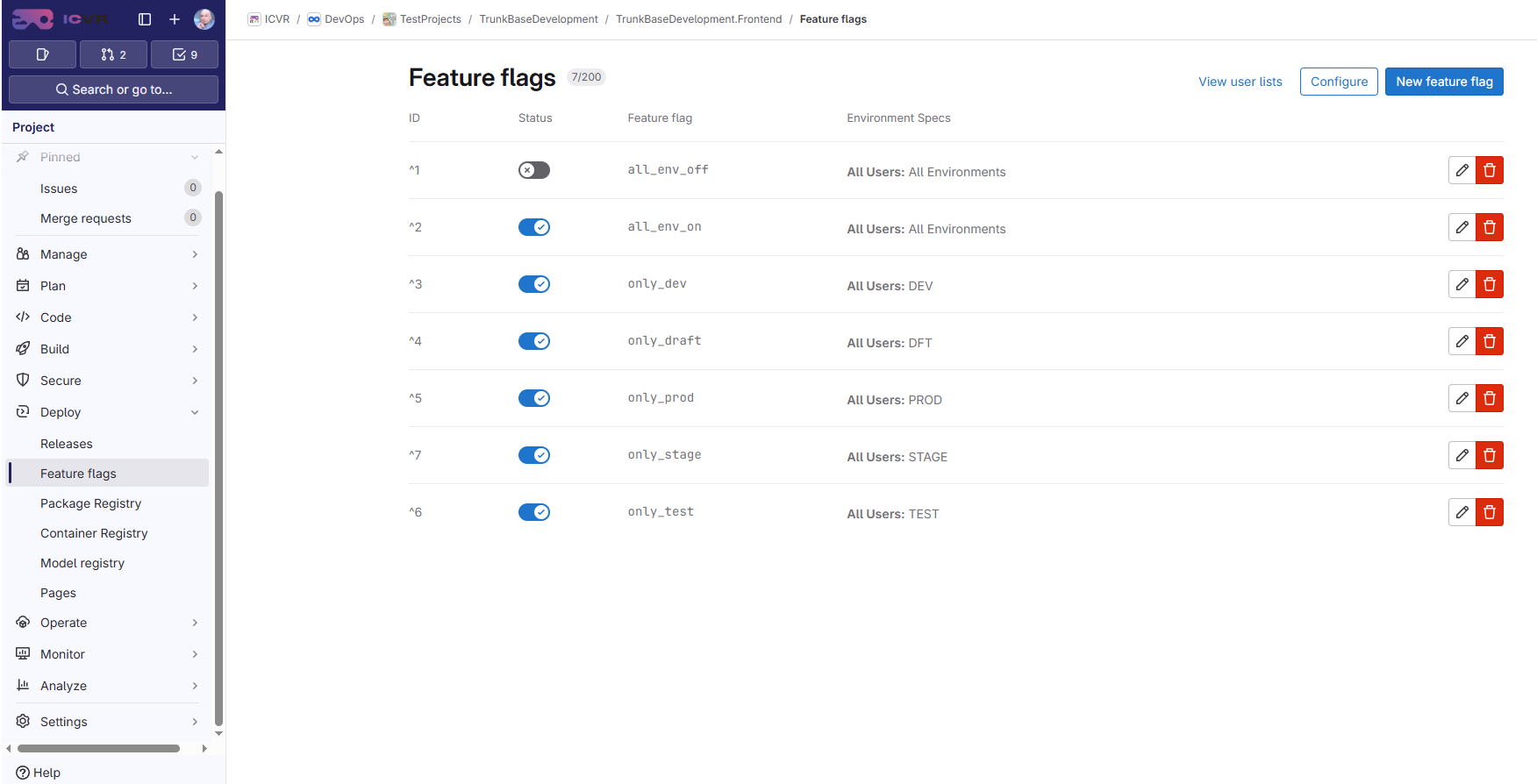
This document describes the Feature Flags architecture used in the ICVR infrastructure. Feature flags are managed in the GitLab UI and automatically delivered to Kubernetes workloads via a custom GitLab Feature Flags Operator.
Key properties:
- Feature flags are created and toggled in GitLab (
Project > Deploy > Feature flags) - The Kubernetes operator watches
GitLabFeatureFlagscustom resources and syncs flag states into Kubernetes Secrets - Applications read
FF_*environment variables at runtime viaenvFrom: secretRef - Flags are per-environment: each overlay resolves its own GitLab
environment_scope(see Environment Scope Resolution) - Flag changes propagate without redeployment (operator updates Secrets, Stakater Reloader restarts pods)
- Feature flags are NOT promoted during environment promotion
Architecture
Custom Resources
| CRD | Scope | Short Name | Purpose |
|---|---|---|---|
ClusterGitLabStore |
Cluster | cgls |
Connection to a GitLab instance (URL + auth token Secret) |
GitLabStore |
Namespaced | gls |
Same but limited to one namespace |
GitLabFeatureFlags |
Namespaced | glff |
Which project's flags to sync and where to write the Secret |
All CRDs belong to the API group icvr.xyz/v1alpha1.
Operator Deployment
The operator is deployed via ArgoCD as a Helm chart in a dedicated namespace.
Namespace
Helm Chart
| Parameter | Value |
|---|---|
| Chart | gitlab-feature-flags-operator |
| Version | 1.1.19-prod |
| Registry | oci:~/~/harbor.infra.xavier.icvr.xyz/infra |
| Namespace | gitlab-feature-flags-operator |
| CRDs | Included (GitLabStore, ClusterGitLabStore, GitLabFeatureFlags) |
Configuration (values.yaml)
clusterStores:
  - name: icvr
    url: "https://git.icvr.io"
    auth:
      existingSecret: "gitlab-token"
image:
  registry: harbor.infra.xavier.icvr.xyz/infra
  repository: devops/gitlab-feature-flags-operator
  tag: "0.1.0b11"
imagePullSecrets:
  - name: harbor-credentials
The clusterStores list creates ClusterGitLabStore resources. Each store points to a GitLab instance and references a Secret containing the PRIVATE-TOKEN.
Secrets
Two ExternalSecrets (sourced from HashiCorp Vault via ClusterSecretStore: vault-icvr):
| Secret | Purpose | Vault Path |
|---|---|---|
gitlab-token |
GitLab API authentication (PRIVATE-TOKEN) |
iac/gitlab_ff_operator |
harbor-credentials |
Harbor container registry pull credentials (.dockerconfigjson) |
iac/harbor/imagePullSecret |
ArgoCD Repository Structure
xvr.argocd/apps/gitlab-feature-flags-operator/
├── base/
│   ├── kustomization.yaml      # Helm chart + resources
│   ├── namespace.yaml          # Namespace: gitlab-feature-flags-operator
│   ├── secret.yaml             # ExternalSecrets (Vault → K8s)
│   └── values.yaml             # Operator configuration
└── overlays/
    ├── dev/kustomization.yaml  # resources: [../../base]
    ├── dft/kustomization.yaml
    ├── tst/kustomization.yaml
    ├── stg/kustomization.yaml
    └── prd/kustomization.yaml
All environment overlays reference only the base — the operator deployment is identical across environments.
Operator RBAC
The Helm chart creates a ClusterRole with permissions to:
icvr.xyzresources:get,list,watch,patch,update(including/status)- Secrets:
get,create,update,patch(to write flag values) - Namespaces:
get(for environment scope inference from labels) - Events and Leases:
create,patch,update(leader election, audit)
How Feature Flags Work
Creating a Feature Flag in GitLab
- Navigate to your GitLab project: Deploy > Feature flags
- Click New feature flag
- Set the flag name (lowercase letters, digits,
_and-; must start with a letter) -
Configure strategies per environment scope:
- All users — flag is enabled for everyone
- Percent of users — gradual rollout
- User IDs — specific users only
- User list — predefined groups
-
Save the feature flag
Info
Naming convention: The operator transforms flag names to FF_{UPPERCASE_NAME} environment variables. Non-alphanumeric characters become underscores.
Example: flag my-dark-mode becomes FF_MY_DARK_MODE=true|false.
To toggle the same logical flag independently per environment, use the --<env> postfix convention (e.g. maintenance_mode--dev, maintenance_mode--prd). The operator strips everything from the first -- onward, so both resolve to FF_MAINTENANCE_MODE. See Flag Naming Conventions.
Operator Synchronization
The operator periodically polls the GitLab Feature Flags API (/api/v4/projects/:id/feature_flags) for each GitLabFeatureFlags CR and:
- Reads the current state of all feature flags (paginated, 100 per page)
- Filters flags by
environment_scope(only active flags with matching scope) - Maps flag states to
FF_FLAG_NAME=trueorFF_FLAG_NAME=false - Creates or updates a Kubernetes Secret in the application's namespace
- Skips update if data is unchanged (no unnecessary churn)
The Secret carries:
- Label
reconcile.gitlab-feature-flags.icvr.xyz/managed: "true" - Annotation
argocd.argoproj.io/compare-options: IgnoreExtraneous(ArgoCD ignores operator-managed keys) - Owner reference to the
GitLabFeatureFlagsCR (garbage-collected on CR deletion)
Application Consumption
Applications consume feature flags by reading FF_* environment variables. No GitLab SDK or Unleash client is needed.
Python example:
import os
def get_feature_flags():
    """Collect all FF_* environment variables into a dict.
    Returns: {"FF_ONLY_DEV": True, "FF_ALL_ENV_OFF": False, ...}
    """
    return {
        key: value.lower() == "true"
        for key, value in os.environ.items()
        if key.startswith("FF_")
    }
Usage in templates (Jinja2):
{% if feature_flags %}
<div class="flags">
    {% for name, enabled in feature_flags.items()|sort %}
    <span class="flag-badge {{ 'flag-on' if enabled else 'flag-off' }}">
        {{ name }}
    </span>
    {% endfor %}
</div>
{% endif %}
Usage in application logic:
flags = get_feature_flags()
if flags.get("FF_NEW_DASHBOARD"):
    return render_template("dashboard_v2.html")
else:
    return render_template("dashboard.html")
Environment Scope Resolution
Feature flags are per-environment. The GitLab environment_scope determines which flag strategies apply. The scope is resolved at two levels:
Helm Chart Side (base-deployment-chart)
When a GitLabFeatureFlags CR is rendered by the Helm chart, the spec.environmentScope is resolved with this priority:
For root-level (common) CR:
gitlabProjectId.environmentScope— explicit scope in the project config mapgitlabProjectId.deploymentEnvironment— environment token mapped via table belowfeatureFlagsEnvironmentScope— explicit global overridedeploymentEnvironment— root-level environment token mapped via table below- Empty (omitted) — operator infers at runtime
For per-app CR:
applications[i].gitlabProjectId.environmentScope— explicit app scopeapplications[i].deploymentEnvironment— app-level tokenfeatureFlagsEnvironmentScope— global overridedeploymentEnvironment— root-level token- Empty (omitted) — operator infers at runtime
Deployment environment → GitLab scope mapping:
| Input token (case-insensitive) | GitLab scope |
|---|---|
DEV, DEVELOPMENT |
dev |
TEST, TST |
tst |
STAGE, STG |
stg |
DRAFT, DFT |
dft |
PROD, PRD, PRODUCTION |
prd |
Empty, pathBase, ~_~_PATH_BASE~_~_ |
(omitted — operator infers) |
| Any other non-empty value | * (wildcard) |
Operator Side (runtime inference)
When spec.environmentScope is absent or * in the CR, the operator resolves it at runtime using an 8-step chain:
- Explicit
spec.environmentScope— if non-empty and not*, use directly - Namespace label
gitlab-feature-flags.icvr.xyz/environment - Namespace label
icvr.xyz/deployment-environment - ArgoCD tracking-id annotation on the namespace — extracts app name, scans segments for env keywords
- Namespace name segments (right-to-left) — e.g.
tbd-test-frontend-stg→stg - CR label
app.kubernetes.io/instance(last segment only) - CR name segments (right-to-left)
- Operator env var
GITLAB_FF_DEFAULT_ENVIRONMENT_SCOPE— cluster-wide fallback - Fallback:
*(wildcard, matches all scopes)
Info
In practice, the Helm chart's deploymentEnvironment value (set per Kustomize overlay) handles most cases. The operator inference chain is a safety net for zero-config scenarios.
Per-Environment Flag States
| Environment | Scope | Flag State | Use Case |
|---|---|---|---|
| DFT | dft |
FF_NEW_DASHBOARD=true |
Test new features after deploy |
| DEV | dev |
FF_NEW_DASHBOARD=true |
Validate in development |
| TST | tst |
FF_NEW_DASHBOARD=false |
Regression testing with flag off |
| STG | stg |
FF_NEW_DASHBOARD=true |
Validate before production |
| PRD | prd |
FF_NEW_DASHBOARD=false |
Not yet released |
Warning
Feature flags are NOT copied during environment promotion. When you promote DEV → TST, only image.tag is copied. Feature flag states remain as configured per environment scope in GitLab. This prevents accidental activation of features in higher environments.
Integrating Feature Flags into a Workload
Minimal Configuration
Add gitlabProjectId to the application in your overlay values.yaml:
Or per-application:
That's it. The base-deployment-chart will:
- Render a
GitLabFeatureFlagsCR (icvr.xyz/v1alpha1) - Inject the resulting Secret via
envFrom: secretRefinto the pod - Add a checksum annotation +
reloader.stakater.com/auto: "true"so pods restart on flag changes
Advanced Configuration
# Environment token — mapped to GitLab scope (see section 5)
deploymentEnvironment: DEV
# Optional: explicit scope override (bypasses mapping)
# featureFlagsEnvironmentScope: "staging"
# Defaults for all GitLabFeatureFlags CRs
gitlabFeatureFlagsDefaults:
  storeRef:
    name: icvr
    kind: ClusterGitLabStore
  refreshInterval: "5m"
# Root-level (scalar)
gitlabProjectId: 12345
# — or root-level (map with overrides) —
# gitlabProjectId:
#   projectId: 12345
#   environmentScope: "staging"   # highest priority
#   storeRef: { name: icvr, kind: ClusterGitLabStore }
#   refreshInterval: "5m"
applications:
  - name: api
    # Per-app project (creates a separate CR + Secret)
    gitlabProjectId: 1327
    # Optional per-app override
    # deploymentEnvironment: PRD
What Gets Rendered
For each gitlabProjectId (root or per-app), the chart creates:
| Level | CR Name | Target Secret | envFrom on pods |
|---|---|---|---|
| Root (common) | {release}-common-ff |
{release}-common-ff-secrets |
All Deployment pods |
| Per-app | {release}-{app}-ff |
{release}-{app}-ff-secrets |
That app's pods only |
The CR spec includes:
apiVersion: icvr.xyz/v1alpha1
kind: GitLabFeatureFlags
metadata:
  name: docs-dev-portal-ff
  annotations:
    argocd.argoproj.io/sync-wave: "0"
spec:
  storeRef:
    name: icvr
    kind: ClusterGitLabStore
  gitlabProjectId: 1217
  environmentScope: "dev"          # resolved from deploymentEnvironment
  targetSecretName: docs-dev-portal-ff-secrets
  refreshInterval: "5m"
Real-World Example: docs/portal
xvr.argocd/workloads/docs/portal/
├── base/
│   ├── kustomization.yaml
│   └── namespace.yaml          # ns: docs
└── overlays/
    ├── dev/
    │   ├── kustomization.yaml  # base-deployment-chart v1.1.18-prod
    │   └── values.yaml         # gitlabProjectId: 1217
    ├── dft/
    │   ├── kustomization.yaml
    │   └── values.yaml         # gitlabProjectId: 1217
    └── prd/
        ├── kustomization.yaml
        └── values.yaml         # gitlabProjectId: 1217
All overlays use the same GitLab project (1217). The environment scope is resolved automatically from the overlay context (namespace labels, ArgoCD tracking-id, or namespace name).
Lifecycle of a Feature Flag
1. CREATION
   Developer creates flag "new_feature" in GitLab UI
   → Operator picks up the flag on next poll (≤ refreshInterval)
   → Secret updated in target namespace
   → Reloader detects change → pod restarts
   → FF_NEW_FEATURE=true available as env var
2. TESTING
   Enable flag in DFT/DEV environment scopes
   → Test feature with flag on
   → Test regression with flag off
   → Gradually enable in TST, STG
3. FULL ROLLOUT
   Enable flag in PRD scope
   → Feature available to all production users
4. CLEANUP
   Remove flag checks from code
   → Deploy code without flag dependency
   → Delete flag from GitLab UI
   → Operator removes key from Secret on next sync
Info
Important: Always clean up feature flags after full rollout. Stale flags accumulate technical debt. A flag that has been enabled in all environments for more than 2 sprints should be considered for removal.
Flag Naming Conventions
| GitLab Flag Name | Env Var | Use Case |
|---|---|---|
new_dashboard |
FF_NEW_DASHBOARD |
Feature toggle |
beta_api_v2 |
FF_BETA_API_V2 |
Versioned feature |
enable_cache |
FF_ENABLE_CACHE |
System capability toggle |
show_banner |
FF_SHOW_BANNER |
UI visibility toggle |
maintenance_mode--dev |
FF_MAINTENANCE_MODE |
Per-environment variant (dev) |
maintenance_mode--prd |
FF_MAINTENANCE_MODE |
Per-environment variant (prd) |
Rules:
- Flag names in GitLab: lowercase, digits,
_and-, must start with a letter - The
FF_prefix and uppercasing are applied automatically by the operator - Non-alphanumeric characters in the flag name become underscores (e.g.
my-flag→FF_MY_FLAG) - Everything from the first
--onward is stripped before computing the env var key (e.g.my_flag--dev→FF_MY_FLAG) - Single dashes are not stripped —
my-flag-dev→FF_MY_FLAG_DEV(the-becomes_) - Flags with the same base name are OR-merged: if any variant is active for the resolved environment scope, the env var is
true - Flags whose name consists entirely of a postfix (e.g.
--dev) are skipped with a warning
Per-Environment Variants
GitLab enforces unique flag names per project. To control the same logical flag per environment independently, create variants using the --<env> postfix:
maintenance_mode--dev   →  FF_MAINTENANCE_MODE  (active only in dev scope)
maintenance_mode--dft   →  FF_MAINTENANCE_MODE  (active only in dft scope)
maintenance_mode--tst   →  FF_MAINTENANCE_MODE  (active only in tst scope)
maintenance_mode--stg   →  FF_MAINTENANCE_MODE  (active only in stg scope)
maintenance_mode--prd   →  FF_MAINTENANCE_MODE  (active only in prd scope)
In each GitLab flag variant, set the strategy's Environment scope to match only that environment (e.g. dev for --dev). The operator then selects the matching variant and writes a single FF_MAINTENANCE_MODE key into the Secret.
Tip
The postfix after -- is purely a GitLab naming workaround — the actual environment filtering is done by the GitLab strategy environment_scope. Keep the postfix consistent with the scope to avoid confusion.
Infrastructure Components
Component Map
| Component | Location | Purpose |
|---|---|---|
| GitLab Feature Flags UI | Project > Deploy > Feature flags |
Create, toggle, and manage flags |
| GitLab Feature Flags API | /api/v4/projects/:id/feature_flags |
Programmatic access (polled by operator) |
| Kubernetes Operator | gitlab-feature-flags-operator namespace |
Sync flags from GitLab to K8s Secrets |
| Operator Helm Chart | oci:~/~/harbor.infra.xavier.icvr.xyz/infra v1.1.19-prod |
Operator deployment + CRDs |
| Base Deployment Chart | oci:~/~/harbor.infra.xavier.icvr.xyz/infra v1.1.18-prod |
Renders GitLabFeatureFlags CRs and injects Secrets into pods |
| ClusterGitLabStore: icvr | Cluster-scoped | GitLab connection (https:~/~/git.icvr.io) + auth reference |
| Vault Secrets | ClusterSecretStore: vault-icvr |
GitLab API token and Harbor credentials |
| Stakater Reloader | Cluster service | Restarts pods when referenced Secrets change |
| ArgoCD | xvr.argocd/apps/gitlab-feature-flags-operator/ |
Operator deployment management |
Backup
The gitlab-feature-flags-operator namespace is included in the Velero backup schedule, ensuring the operator state is recoverable in case of cluster failure.
Adding Feature Flags for Local Development
For local development, use a .env file to define your feature flags:
Load them in your application startup (e.g. python-dotenv, docker --env-file .env, etc.).
Comparison with Alternatives
| Approach | Pros | Cons |
|---|---|---|
| GitLab Operator (our approach) | No SDK needed; pure env vars; managed via GitLab UI; per-environment control; no app code changes to read flags | Depends on custom operator; polling delay (default 5 min) |
| Unleash SDK | Rich targeting rules; real-time updates; battle-tested | Requires SDK integration in every app; separate Unleash server |
| LaunchDarkly | Enterprise features; analytics; audit trail | SaaS dependency; expensive at scale; SDK per language |
| Static env vars | Simple; no moving parts | Requires redeployment to change; no toggle without redeploy |
| ConfigMap manual | Kubernetes-native | Manual; error-prone; no UI for non-DevOps |
Diagram: Full Flow from Toggle to Application
ArgoCD manages the operator deployment and workload GitLabFeatureFlags CRs.
Vault provides secrets (GitLab token, Harbor credentials).
Stakater Reloader triggers pod restarts on Secret changes.
Velero backs up the operator namespace.