StoryCraft
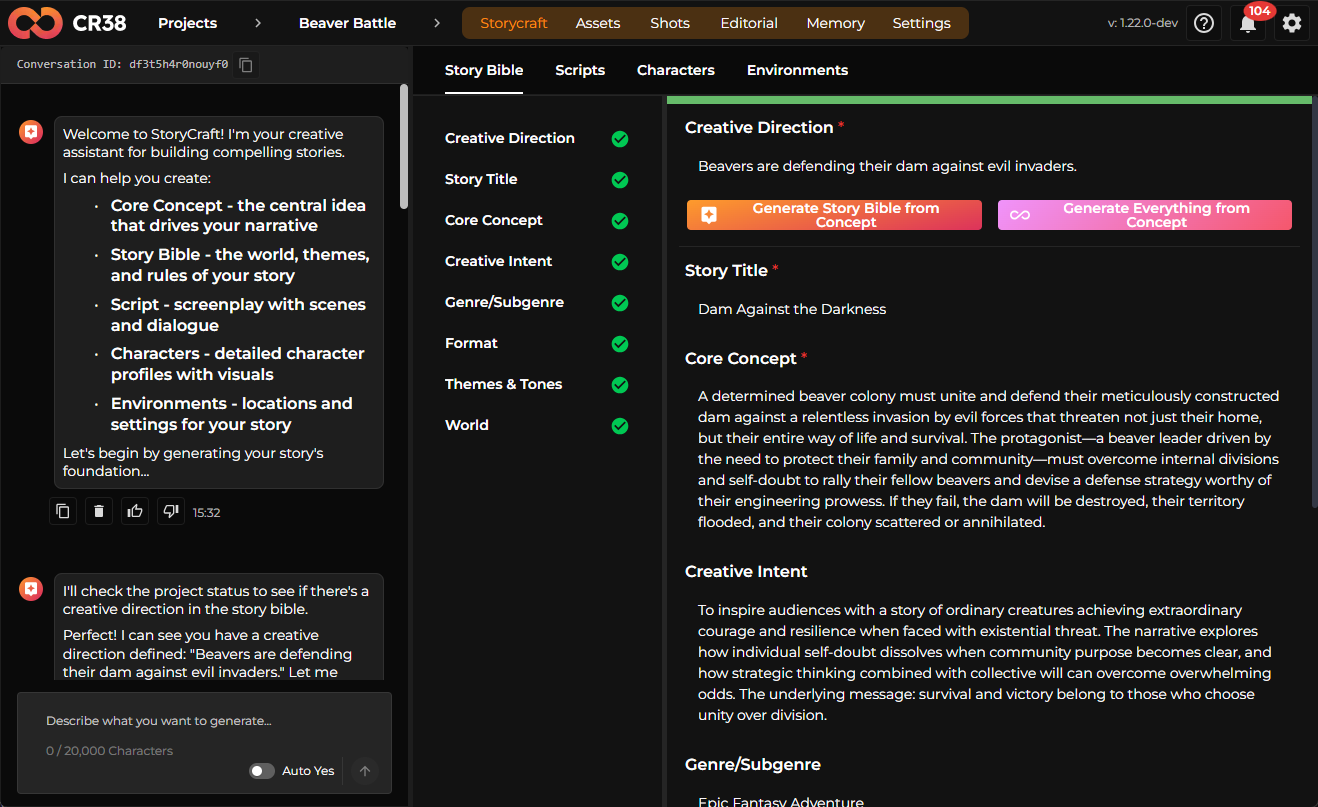
StoryCraft is the creative heart of Craftology. It is where an idea evolves into a complete narrative universe — characters, environments, scenes, and cinematic scripts that eventually become visual assets.
Rather than forcing creators to move between multiple disconnected tools, StoryCraft brings the entire storytelling workflow into one place. It combines structured story development with AI-assisted generation so that writers, directors, and visual creators can move quickly from concept to production.
Inside StoryCraft, a project grows organically. You begin with a simple idea and gradually develop a world, a cast of characters, environments where events unfold, and ultimately a screenplay ready to be visualized.
Opening StoryCraft
StoryCraft is the starting point of every Craftology project.
To begin working with it, open a project and select StoryCraft from the top navigation bar. The workspace then reveals a set of creative tools organized into several tabs that guide the storytelling process.
At the top level, StoryCraft is divided into four areas:
- Story Bible
- Scripts
- Characters
- Environments
Each section represents a stage in the evolution of a narrative. Together they form the structural backbone of a cinematic project.
The Story Assistant
On the left side of the interface you will see the Story Assistant, a conversational AI companion designed to help generate and refine narrative content.
The assistant can create nearly every element of a story — from early concept ideas to full screenplay drafts. It also keeps track of previous prompts and responses, making it easy to revisit earlier creative directions.
When you want to generate multiple story elements at once, the Generate Everything button can automatically build a complete narrative structure. Alternatively, you can describe exactly what you want to create in the prompt field and generate content step by step.
This conversational approach allows StoryCraft to feel less like a form editor and more like a collaborative writing environment.
Story Bible
The Story Bible is the narrative foundation of the project. It describes the core idea, the world in which the story takes place, and the themes that guide the narrative.
A well-defined story bible ensures that every subsequent element — scripts, characters, and environments — remains consistent with the overall vision of the story.
Within this section, you will define elements such as the creative direction of the project, the story’s title, and the core concept that drives the narrative forward. The creative intent explains what the story aims to communicate emotionally or philosophically, while genre and format clarify the style of storytelling.
Themes and tone describe the atmosphere of the narrative — whether it is tense, hopeful, tragic, or epic — and the world description explains the environment where the story unfolds.
StoryCraft can generate these sections automatically from a short concept description. When you provide the core idea, the system can expand it into a full narrative framework.
Tip
If you are starting from a rough idea, begin by generating the Story Bible from a concept. This provides a strong narrative structure for the rest of the project.
Scripts
Once the story bible has been established, StoryCraft can transform it into a screenplay.
The Scripts section gradually develops the story into three layers: a summary, an outline, and the full script itself.
The process usually begins with a script summary, which describes the narrative arc of the story in prose form. It introduces the central conflict, the protagonist’s struggle, and the eventual resolution.
From the summary, StoryCraft generates a script outline. This outline breaks the narrative into individual scenes. Each scene describes where events occur, what happens in that moment of the story, and how it contributes to the overall narrative progression.
Finally, the script tab expands those scenes into a cinematic screenplay. Here you will see scene headings, character dialogue, and action descriptions formatted in a way familiar to film and television scripts.
An example of a generated scene might look like this:
Scene example
SCENE 6 — FULL SCREENPLAY EXPANSION
INT. DAM CHAMBER – DAWN
Pale golden light filters through the chamber's upper openings. Dust motes drift lazily through the beams. The chamber is scarred—claw marks on walls, scattered debris, water stains from the night's battle. Yet the structure stands firm.
CEDAR, a beaver with a notch in his left ear, surveys the gathered colony. His chest rises and falls with exhaustion. But his eyes burn with clarity—the fog of self-doubt has lifted.
The colony files in slowly. Some limp. Some carry bandages fashioned from moss and bark. Others support wounded companions. They are battered. Bloodied. Alive.
They form a semicircle around Cedar, waiting. The weight of leadership still sits on his shoulders, but now it feels earned rather than imposed.
CEDAR (voice steady, not loud) We stood.
A beat. The words hang in the chamber.
CEDAR (CONT'D) When fear told us to run, we stood. When doubt whispered that we couldn't hold, we stood together.
WILLOW, a younger beaver with matted fur, steps forward. Her eyes are wet.
WILLOW I was afraid.
CEDAR We all were.
WILLOW But we didn't leave. We didn't break.
Cedar nods. He looks across the gathered faces—old and young, strong and frail, all of them marked by the night but unbroken.
CEDAR The dam still stands because you stand. Because we chose each other over fear.
An older beaver, STONE, moves to the nearest wall and places his paw against it. His paw is scarred from a lifetime of building.
STONE Three generations built this dam. We defended it in one night.
Others step forward, touching the walls. Some close their eyes. Some whisper thanks—to the colony, to the dam itself, to something beyond.
Cedar watches them. For the first time, he doesn't feel the weight of their expectations crushing him. He feels their strength flowing through him.
CEDAR Gather the wounded. Repair what can be repaired. And tomorrow, we rebuild what cannot.
WILLOW And the darkness? Will it return?
Cedar looks toward the chamber's opening, where the first true light of dawn breaks over the water.
CEDAR If it does, we'll be ready. Because we know now what we're capable of when we're united.
He turns back to his colony.
CEDAR (CONT'D) We're not just beavers who built a dam. We're beavers who defended it. We're beavers who chose to stand together.
A moment of silence. Then Willow raises her paw. Others follow. The gesture spreads through the chamber—not a cheer, but a quiet affirmation. A collective exhale.
The light grows stronger, illuminating the dam chamber in full. The scars of battle are visible, but so is the structure's resilience. The colony stands in that light—transformed, unified, and unbreakable.
Cedar stands among them, no longer burdened by doubt, but grounded in the certainty that together, they can face whatever comes next.
FADE OUT.
This structured screenplay becomes the basis for generating scenes, shots, and visual content later in the Craftology pipeline.
Characters
Stories come alive through their characters, and the Characters section is where those personalities take shape.
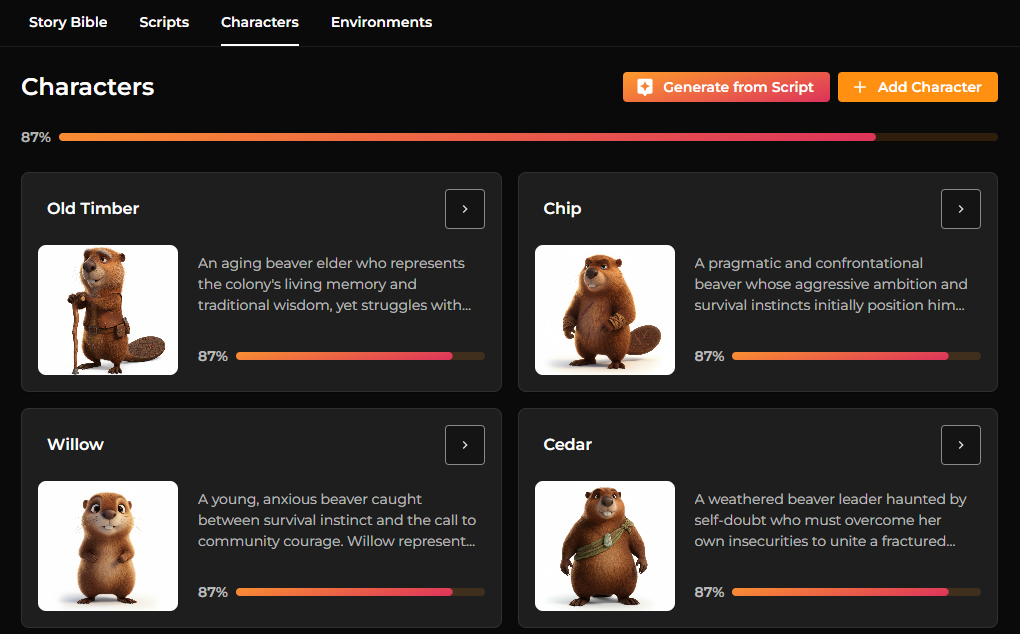
Each character appears as a visual card containing an image reference and a brief description. Opening a character reveals a more detailed profile that explores the character’s personality, motivations, appearance, and personal history.
Rather than limiting characters to a short description, StoryCraft encourages a richer narrative profile. A character entry might describe not only what a character looks like, but also how they speak, what drives them emotionally, and what internal conflicts they face.
This deeper information helps maintain consistency when characters appear in scenes or dialogue later in the script.
Visual references can also be generated for characters. These images act as early concept art, helping define the character’s look and style.
Characters can be created directly from the script, from the story bible, or through prompts provided to the Story Assistant.
Environments
Just as characters define who inhabits a story, environments define where events take place.
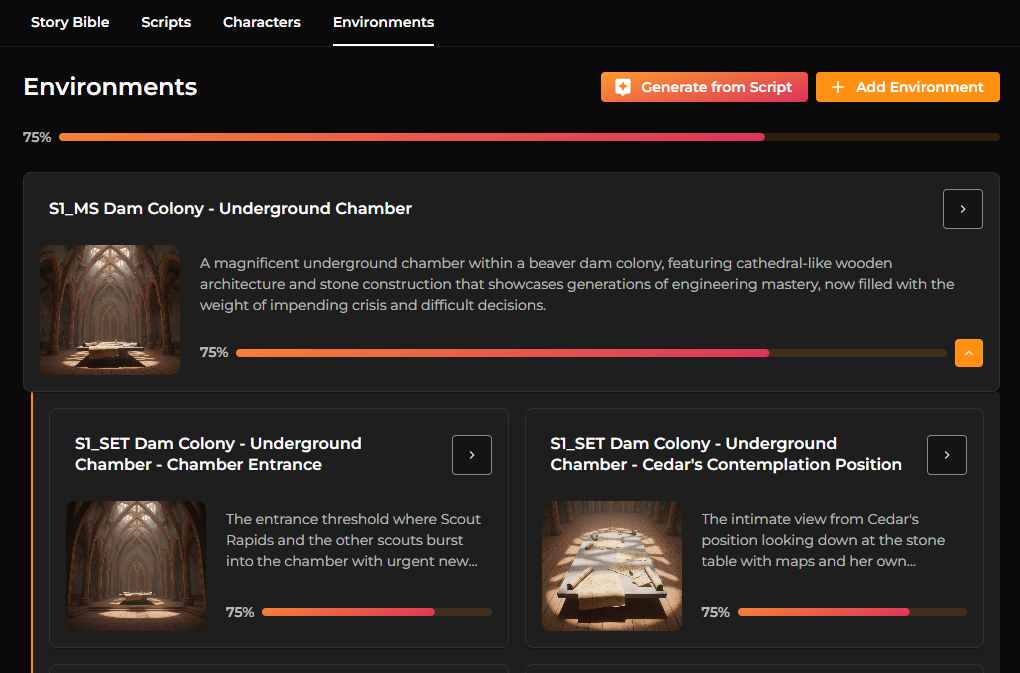
The Environments section allows you to create and describe the physical locations that appear in your script. These environments might represent large narrative spaces — such as a dam colony, forest clearing, or underground chamber — or smaller areas that capture specific cinematic moments.
Each environment contains a visual reference image, a short summary, and a detailed visual description that explains lighting, atmosphere, time of day, and mood.
For example, an environment description might specify that a chamber is lit by filtered daylight streaming through gaps in wooden structures, creating an atmosphere that feels both majestic and foreboding.
These details are especially important when generating scenes or visual media, as they help guide the AI toward consistent visual storytelling.
From Story to Visual Content
The purpose of StoryCraft is not only to write a story, but to prepare it for cinematic generation.
Once the story bible, script, characters, and environments are complete, Craftology can begin generating visual scenes and shots. Scenes are divided into individual camera shots, each representing a single moment in the narrative.
For each shot, the system can generate a starting image that establishes composition, lighting, and character placement. This image can then be used as the foundation for generating short cinematic video clips.
Audio can also be generated for scenes, including character dialogue or ambient sound based on the context of the moment.
In this way, StoryCraft becomes the narrative engine that drives the entire creative pipeline — from the first concept to the final visual output.
Working with AI Generation
StoryCraft supports two different creative approaches.
Some creators prefer to generate everything automatically and then refine the results. Others prefer to guide the process carefully, generating one section at a time and editing it as they go.
Both approaches are supported. Every generated section can be edited manually, regenerated, or expanded using prompts. StoryCraft also keeps track of generation history, allowing you to revisit earlier ideas or experiment with alternate versions of the same content.
Note
Deleting a character, environment, or scene removes its associated generation history.
Recommended Workflow
Although StoryCraft is flexible, most projects follow a natural progression.
Creators typically begin by defining the story bible, then generate the script summary and outline. From there, characters and environments are created to support the scenes described in the script.
Once those elements exist, the story is ready to be transformed into cinematic content.
The result is a seamless transition from narrative design to visual storytelling — one of the core goals of the Craftology platform.