How to Run ML Multi-Agent Framework (Step-by-Step Guide)
This guide walks you through running the full Multi-Agent Framework locally on your machine.
We’ll go in the correct startup order:
The order matters — each layer depends on the one before it.
Before You Start: Understand the Architecture
Knowing why you're doing each step will make troubleshooting much easier.
MCP Servers
These expose tools (DB writes, API calls, model access, etc.).
- Agents depend on MCP servers.
- If required MCP servers are not running, agents may fail silently or crash.
- MCP servers register themselves in PostgreSQL.
Agents
Each agent:
- Looks up MCP servers in PostgreSQL.
- Registers itself in PostgreSQL.
- Exposes an API endpoint.
Router
The Router:
- Is the single entry point for frontend requests.
- Reads agent metadata from PostgreSQL.
- Routes requests deterministically using
agent_key.
Optional Integrations
Some components may reference:
- Sentry
- Temporal
- Langfuse
- Kafka
These are not required for basic functionality. Missing credentials will only affect specific actions, not the core system.
Prerequisites
Python (<= 3.12)
Some dependencies (e.g., LangGraph) require Python ≤ 3.13. Asynchronous calls may not be properly managed in Python versions newer than 3.12.
If you have a newer version installed:
- Install Python 3.12 from python.org
- Use that version for virtual environments
Verify:
PostgreSQL
Install PostgreSQL locally.
Default expected credentials:
POSTGRES_HOST=localhost
POSTGRES_PORT=5432
POSTGRES_DB=agents_system_base
POSTGRES_USER=postgres
POSTGRES_PASSWORD=postgres
After installation, use the PgAdmin utility shipped with the database to create the database and two tables.
Note
Ensure you have the necessary administrative permissions to create a database and tables.
Create the Database
Create a database named:
Create Required Tables
Create the mcp_servers and deployed_agents tables.
CREATE TABLE IF NOT EXISTS public.mcp_servers
(
    pk_id integer NOT NULL GENERATED ALWAYS AS IDENTITY,
    name varchar(100),
    url varchar(255),
    description text,
    tags text,
    is_active boolean,
    updated_at timestamp with time zone,
    CONSTRAINT unique_name UNIQUE (name)
);
CREATE TABLE IF NOT EXISTS public.deployed_agents
(
    name varchar(100),
    agent_key varchar(255),
    url varchar(255),
    capabilities text,
    keywords text,
    is_active boolean,
    updated_at timestamp with time zone,
    id integer NOT NULL GENERATED BY DEFAULT AS IDENTITY,
    CONSTRAINT deployed_agents_name_key UNIQUE (name)
);
Rust (Required for Python Dependencies)
Why you need Rust
- Some Python packages (like cryptography, PyO3-based packages, maturin-built packages) now require Rust to compile native extensions.
- If Rust/Cargo is not on your system PATH, pip tries a temporary install → slow and often fails.
Installation
Visual Studio Prerequisites
Install the Visual Studio's latest version (currently 2022) with minimum requirements which are the Build Tools for Visual Studio without the IDE. Select “Desktop Development with C++” in the Visual Studio installer. For more information on installation process, review the following document: MSVC prerequisites.
Why this happens
On Windows:
- Rust defaults to the MSVC toolchain
- That toolchain depends on Microsoft’s C++ linker
- Fresh Windows machines don’t include it
- VS Code does NOT provide compilers or linkers
So until Build Tools are installed, Rust cannot finish compiling packages like:
- cryptography
- writeable
- pyo3-based libs
- maturin packages
Install Rust
- Go to Rustup Installer page.
- Download and run the installer (choose default installation).
Verify installation:
Create Cache Folder for Dependencies
Make a new empty folder that will be used as pip cache. For example, C:\cache\pip. The cache accelerates the installation of Python dependencies for Agent projects.
Collect Required Credentials
PostgreSQL
Default expected credentials:
POSTGRES_HOST=localhost
POSTGRES_PORT=5432
POSTGRES_DB=agents_system_base
POSTGRES_USER=postgres
POSTGRES_PASSWORD=postgres
PocketBase
AWS Bedrock
If you don’t have credentials, request them from your helpdesk.
Clone the Repositories
Clone the following repos:
MCP Servers:
mcp.storycraft.pythonmcp.projectstructure.pythonmcp.generationtasks.pythonmcp.modelsinformation.python
Agents:
imagegenerationagent.pythonprojectagent.pythonstorycraftagent.pythonvideogenerationagent.python
Router:
routerservice.python
Optional Web/Test Client:
agentswebclient.python
You can create an empty folder (for example, ML) and clone all necessary git repositories to that folder:
echo MCP Servers
git clone git@git.icvr.io:icvr/xavier/ml/multi-agent-system/mcp-servers/mcp.storycraft.python.git
git clone git@git.icvr.io:icvr/xavier/ml/multi-agent-system/mcp-servers/mcp.projectstructure.python.git
git clone git@git.icvr.io:icvr/xavier/ml/multi-agent-system/mcp-servers/mcp.generationtasks.python.git
git clone git@git.icvr.io:icvr/xavier/ml/multi-agent-system/mcp-servers/mcp.modelsinformation.python.git
echo Agents
git clone git@git.icvr.io:icvr/xavier/ml/multi-agent-system/agents/imagegenerationagent.python.git
git clone git@git.icvr.io:icvr/xavier/ml/multi-agent-system/agents/projectagent.python.git
git clone git@git.icvr.io:icvr/xavier/ml/multi-agent-system/agents/storycraftagent.python.git
git clone git@git.icvr.io:icvr/xavier/ml/multi-agent-system/agents/videogenerationagent.python.git
echo Router
git clone git@git.icvr.io:icvr/xavier/ml/multi-agent-system/routerservice.python.git
echo Web Client
git clone git@git.icvr.io:icvr/xavier/ml/multi-agent-system/prototypes/agentswebclient.python.git
All repositories use the Develop branch by default.
Tip
You can run VS Code, open the ML folder and within the VSCode IDE open each repo folder in the integrated terminal to start servers, agents and router.
Step 1 — Start MCP Servers
If unsure which agent depends on which MCP server — just run all four.
For each MCP server do the following:
Open Repo Folder
Open terminal inside the repo directory.
Configure Environment
Fill in:
- PostgreSQL credentials
- PocketBase credentials
- AWS credentials
Create Virtual Environment
python -m venv .venv
.venv\Scripts\activate
pip install -r requirements.txt
pip install "psycopg[binary]"
The psycopg[binary] ensures PostgreSQL native bindings are installed.
Start Server
You should see:
INFO:     Application startup complete.
INFO:     Uvicorn running on http://localhost:80XX (Press CTRL+C to quit)
Verify Registration
Open PostgreSQL database (you can use the PgAdmin utility) and examine the mcp_servers table.
You should see one row per running MCP server.

If not:
- Check DB credentials
- Check server logs
Step 2 — Start Agents
Repeat the following actions for each agent repository.
Configure .env
Fill required credentials.
Install Dependencies
py -m venv .venv
.venv\Scripts\activate
python -m pip install --upgrade pip setuptools wheel
pip install --upgrade --cache-dir C:\cache\pip psycopg[binary] -r requirements.txt
Start Agent
Expected:
INFO:     Application startup complete.
INFO:     Uvicorn running on http://localhost:80XX (Press CTRL+C to quit)
Verify Registration
Open PostgreSQL database (you can use the PgAdmin utility) and examine the deployed_agents table.
Each agent should register itself automatically.

If missing:
- Check DB config
- Confirm MCP servers are running
Step 3 — Start the Router
The Router must start after agents.
Configure Environment
Fill PostgreSQL credentials.
Install & Run
python -m venv .venv
.venv\Scripts\activate
pip install -r requirements.txt
pip install "psycopg[binary]"
python main.py
Confirm Agent Discovery
On startup, router logs should say it found agents.
If it doesn't:
- Check
deployed_agentstable - Verify DB credentials
Step 4 — Run the Web Test Client (Optional)
Start the agentswebclient.python project
It uses the same pattern: create venv, install, run the provided scripts. The .env file is not used in that project, and you do not have to specify any settings to run it properly.
Run the following commands:
Prepare a payload (IDs + routing fields)
The example_payloads folder contains sample JSON files for different scenarios.
The payload format described includes:
user_id(from marketplace / PocketBase)project_idconversation_id…and some constant fields that don’t change at the moment.
Routing fields:
agents_modeis “deterministic”agent_keyselects which agent gets the request
{
    "message": "hi",
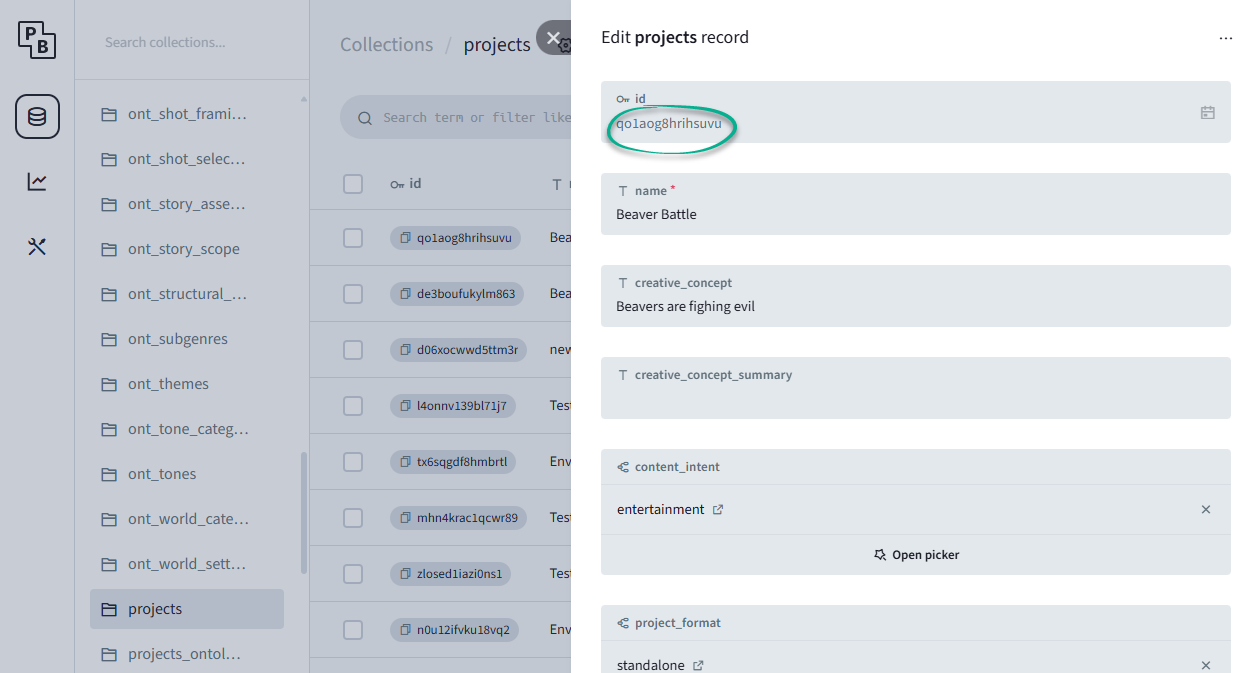
    "user_id": "05a62227-d340-7447-8314-194b6595a76a",
    "project_id": "qo1aog8hrihsuvu",
    "conversation_id": "5s9admp8wyvaeb8",
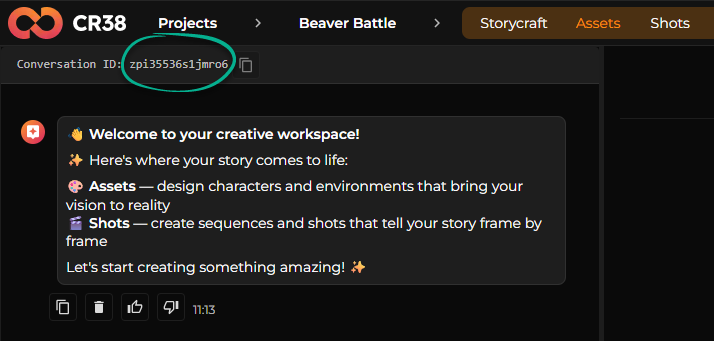
    "context": "sct_bible",
    "agents_mode": "deterministic",
    "agent_key": "storycraft",
    "stream_format": "ndjson"
}
You should edit the existing payload (or copy it to create a new one), and specify the project_id and conversation_id.
Where to get IDs
- Project ID: created by the frontend flow; you can fetch it from the Pocketbase Projects collection (the text shows getting an existing project and copying its ID).
- Conversation ID: the frontend auto-creates conversations; you pick the one for the agent/page you’re testing and copy its ID.
Run Interactive script
Use the script chat_interactive_json.py that accepts a payload; you (re)start it after changing IDs so it connects to the proper conversation:
The dialog may proceed like this:
(.venv) C:\ML\agentswebclient.python>python src\chat_interactive_json.py example_payloads\storycraft.json

============================================================
AgentRouter - Interactive Chat
============================================================
Commands:
  /quit or q - Exit chat
  /info - Show session information
  /payload - Show current payload
  /raw - Toggle raw JSON display
============================================================


============================================================
Session Information
============================================================
URL: http://localhost:8000
User ID: xxxx-xxx-xxxxxx-xxxx-xxxxxxxxxx
Project ID: qo1aog8hrihsuvu
Card ID: N/A
Context: sct_bible
Agent Mode: deterministic
Agent Key: storycraft
Stream Format: ndjson
============================================================

You: hi!
Agent: Hey there! 👋

You're working on **"Beaver Battle"** - your story about intelligent beavers defending their dam against an evil force.

You've got your Story Bible all set up, and now you're ready to bring this story to life! Would you like to:

- **Generate the script** - Create the full screenplay with scenes and action
- **Brainstorm variations** - Explore different creative directions for your beaver story
- **Generate everything** - Create script, characters, and environments all at once

What sounds good to you?
  🔧 Tool: send_suggestions(actions=[{'label': 'Generate Script', 'type': 'message', 'value': 'generate the script'}, {'label': 'Brainstorm Ideas', 'type': 'message', 'value': 'help me brainstorm'}, {'label': 'Generate Everything', 'type': 'message', 'value': 'generate everything'}])

  ⏳ Thinking about next steps...
  ✅ Result: Command(update={'messages': [ToolMessage(content='Sent 3 suggestion buttons to user.', tool_call_id=...
Agent:
You: No, thanks
Agent: No problem! Is there something specific you'd like to work on with your Beaver Battle story, or would you prefer to explore something different? I'm here to help however you'd like!
You:
Final Checklist
Confirm:
- All 4 MCP servers running
-
mcp_serverstable populated - Agents running
-
deployed_agentstable populated - Router running and discovered agents
- Test client successfully sends payload
Addendum - Python Script
launch_framework.py
#!/usr/bin/env python3
"""
launch_framework.py — Orchestrate:
MCP servers -> Agents -> Router

Commands:
  python launch_framework.py clone
  python launch_framework.py prep
  python launch_framework.py start
  python launch_framework.py status
  python launch_framework.py logs
  python launch_framework.py stop
"""

from __future__ import annotations

import argparse
import os
import platform
import shutil
import signal
import subprocess
import sys
import time
from pathlib import Path
from typing import Dict, List


# --------------------------------------------------
# CONFIGURATION (edit only if folder names change)
# --------------------------------------------------

MCP_REPOS = [
    "mcp.storycraft.python",
    "mcp.projectstructure.python",
    "mcp.generationtasks.python",
    "mcp.modelsinformation.python",
]

AGENT_REPOS = [
    "imagegenerationagent.python",
    "projectagent.python",
    "storycraftagent.python",
    "videogenerationagent.python",
]

ROUTER_REPO = "routerservice.python"
CLIENT_REPO = "agentswebclient.python"

# ---- Git clone URLs ----
CLONE_MAP = {
    "mcp.storycraft.python":
        "git@git.icvr.io:icvr/xavier/ml/multi-agent-system/mcp-servers/mcp.storycraft.python.git",
    "mcp.projectstructure.python":
        "git@git.icvr.io:icvr/xavier/ml/multi-agent-system/mcp-servers/mcp.projectstructure.python.git",
    "mcp.generationtasks.python":
        "git@git.icvr.io:icvr/xavier/ml/multi-agent-system/mcp-servers/mcp.generationtasks.python.git",
    "mcp.modelsinformation.python":
        "git@git.icvr.io:icvr/xavier/ml/multi-agent-system/mcp-servers/mcp.modelsinformation.python.git",

    "imagegenerationagent.python":
        "git@git.icvr.io:icvr/xavier/ml/multi-agent-system/agents/imagegenerationagent.python.git",
    "projectagent.python":
        "git@git.icvr.io:icvr/xavier/ml/multi-agent-system/agents/projectagent.python.git",
    "storycraftagent.python":
        "git@git.icvr.io:icvr/xavier/ml/multi-agent-system/agents/storycraftagent.python.git",
    "videogenerationagent.python":
        "git@git.icvr.io:icvr/xavier/ml/multi-agent-system/agents/videogenerationagent.python.git",

    "routerservice.python":
        "git@git.icvr.io:icvr/xavier/ml/multi-agent-system/routerservice.python.git",
    "agentswebclient.python":
        "git@git.icvr.io:icvr/xavier/ml/multi-agent-system/prototypes/agentswebclient.python.git",
}

MCP_ENTRY = Path("scripts") / "start_server.py"
AGENT_ENTRY = Path("main.py")
ROUTER_ENTRY = Path("main.py")
CLIENT_ENTRY = Path("main.py")

RUN_DIRNAME = ".run"
LOGS_DIRNAME = "logs"
PIDS_DIRNAME = "pids"


# --------------------------------------------------
# Helpers
# --------------------------------------------------

def is_windows():
    return platform.system().lower().startswith("win")


def venv_python(repo_dir: Path):
    if is_windows():
        return repo_dir / ".venv" / "Scripts" / "python.exe"
    return repo_dir / ".venv" / "bin" / "python"


def ensure_dirs(root: Path):
    logs = root / RUN_DIRNAME / LOGS_DIRNAME
    pids = root / RUN_DIRNAME / PIDS_DIRNAME
    logs.mkdir(parents=True, exist_ok=True)
    pids.mkdir(parents=True, exist_ok=True)
    return logs, pids


def ensure_git():
    try:
        subprocess.check_call(["git", "--version"], stdout=subprocess.DEVNULL)
    except Exception:
        raise RuntimeError("git not found on PATH. Install Git first.")


# --------------------------------------------------
# Clone logic
# --------------------------------------------------

def clone_repos(root: Path):
    ensure_git()

    repos = MCP_REPOS + AGENT_REPOS + [ROUTER_REPO] + CLIENT_REPO

    for repo in repos:
        target = root / repo
        if target.exists():
            print(f" exists: {repo}")
            continue

        if repo not in CLONE_MAP:
            raise RuntimeError(f"No clone URL configured for {repo}")

        print(f"⬇️  cloning: {repo}")
        subprocess.check_call(["git", "clone", CLONE_MAP[repo], str(target)])

    print(" clone complete.")


# --------------------------------------------------
# Environment / venv / deps
# --------------------------------------------------

def copy_env(repo_dir: Path):
    env = repo_dir / ".env"
    example = repo_dir / ".env.example"
    if not env.exists() and example.exists():
        shutil.copyfile(example, env)
        print(f" created .env in {repo_dir.name} (fill secrets before start)")


def ensure_venv(repo_dir: Path, python_cmd: str):
    venv_dir = repo_dir / ".venv"
    if venv_dir.exists():
        return
    print(f" creating venv: {repo_dir.name}")
    subprocess.check_call([python_cmd, "-m", "venv", ".venv"], cwd=repo_dir)


def ensure_deps(repo_dir: Path):
    req = repo_dir / "requirements.txt"
    if not req.exists():
        return
    py = venv_python(repo_dir)
    print(f" installing deps: {repo_dir.name}")
    subprocess.check_call([str(py), "-m", "pip", "install", "--upgrade", "pip"], cwd=repo_dir)
    subprocess.check_call([str(py), "-m", "pip", "install", "psycopg[binary]", "-r", "requirements.txt"], cwd=repo_dir)


# --------------------------------------------------
# Service control
# --------------------------------------------------

def start_service(root: Path, logs: Path, pids: Path, name: str, repo: str, entry: Path):
    repo_dir = root / repo
    py = venv_python(repo_dir)

    if not py.exists():
        raise RuntimeError(f"{repo} missing venv. Run prep first.")

    log_file = logs / f"{name}.log"
    pid_file = pids / f"{name}.pid"

    print(f"  starting {name}")

    log = open(log_file, "ab")

    env = os.environ.copy()
    env["PYTHONUTF8"] = "1"

    proc = subprocess.Popen(
        [str(py), "-X", "utf8", str(entry)],
        cwd=repo_dir,
        stdout=log,
        stderr=subprocess.STDOUT,
        env=env,
    )

    pid_file.write_text(str(proc.pid))
    print(f"   PID={proc.pid}")

def strip_unicode(s: str) -> str:
    return s.encode("ascii", "ignore").decode("ascii")

def stop_all(root: Path):
    pids_dir = root / RUN_DIRNAME / PIDS_DIRNAME
    if not pids_dir.exists():
        return

    for pid_file in pids_dir.glob("*.pid"):
        pid = int(pid_file.read_text())
        print(f" stopping {pid_file.stem}")
        try:
            os.kill(pid, signal.SIGTERM)
        except Exception:
            pass
        pid_file.unlink()

    print(" stopped.")


# --------------------------------------------------
# Main
# --------------------------------------------------

def main():
    parser = argparse.ArgumentParser()
    parser.add_argument("command", choices=["clone", "prep", "start", "stop", "status"])
    parser.add_argument("--python", default="py" if is_windows() else "python3")
    args = parser.parse_args()

    root = Path(__file__).resolve().parent
    logs, pids = ensure_dirs(root)

    if args.command == "clone":
        clone_repos(root)
        return

    if args.command in ["prep"]:
        clone_repos(root)

        repos = MCP_REPOS + AGENT_REPOS + [ROUTER_REPO]

        for repo in repos:
            repo_dir = root / repo
            copy_env(repo_dir)
            ensure_venv(repo_dir, args.python)
            ensure_deps(repo_dir)

        if args.command == "prep":
            print(" prep complete.")
            return

    if args.command == "start":
        for i, r in enumerate(MCP_REPOS):
            start_service(root, logs, pids, f"mcp-{i+1}", r, MCP_ENTRY)

        time.sleep(2)

        for i, r in enumerate(AGENT_REPOS):
            start_service(root, logs, pids, f"agent-{i+1}", r, AGENT_ENTRY)

        time.sleep(2)

        start_service(root, logs, pids, "router", ROUTER_REPO, ROUTER_ENTRY)

        print(" all services started.")
        return

    if args.command == "stop":
        stop_all(root)
        return

    if args.command == "status":
        for pid_file in (root / RUN_DIRNAME / PIDS_DIRNAME).glob("*.pid"):
            pid = int(pid_file.read_text())
            try:
                os.kill(pid, 0)
                print(f" {pid_file.stem} (PID={pid})")
            except OSError:
                print(f" {pid_file.stem} not running")


if __name__ == "__main__":
    main()
Usage
# clone only
python launch_framework.py clone

# clone + prep
python launch_framework.py prep

# full start
python launch_framework.py start

# status
python launch_framework.py status

# stop
python launch_framework.py stop